The PrepEx Journal
How to Track IELTS Student Progress and Assign Homework by Skill (2026)
To track IELTS student progress, set three to six tasks a week by skill and check completion, each skill's band trend and every student's lowest Writing and Speaking criterion. PrepEx lets IELTS tutors assign Writing, Speaking, Reading and Listening tasks with due dates, open each essay and Speaking answer with a band for every criterion, and export a progress report for each student.

On this page
To track IELTS student progress, set homework by skill every week and check three things on the same day: who finished it on time, which way each skill's band is moving, and which Writing and Speaking criterion is lowest for each student. With PrepEx, you assign IELTS Writing, Speaking, Reading and Listening tasks with a due date, see who completed them, open each essay and Speaking answer with a band for every criterion, and export a progress report for each student.
Assign IELTS homework and see every student's bands
Book a 15-minute walkthrough and the PrepEx team sets up your teacher account and student seats. Each seat gives that student IELTS Pro, so they don't pay separately.
Jump to the four-week homework plan
We checked the IELTS facts on this page against ielts.org on 16 November 2026 and the teacher features against the PrepEx workspace the same day.
The short answer
Give each student three to six IELTS tasks a week, with at least one Writing and one Speaking task, a due date and one clear target. Every Friday, check completion, the band trend for each skill and the lowest criterion in each Writing and Speaking answer. Then set next week's tasks against that weakness. In PrepEx, the Assignment tracker, attempt review and each student's Overview tab show all of this.
What IELTS scores, and why it matters for tracking
IELTS gives a band from 0 to 9 for Listening, Reading, Writing and Speaking. The overall band is the average of the four, rounded to the nearest half band. An average ending in .25 goes up to the next half band, and one ending in .75 goes up to the next whole band. Our band score calculation guide works through examples.
- Writing is marked on Task Achievement (Task 1) or Task Response (Task 2), Coherence and Cohesion, Lexical Resource, and Grammatical Range and Accuracy. Task 2 counts twice as much as Task 1.
- Speaking is marked on Fluency and Coherence, Lexical Resource, Grammatical Range and Accuracy, and Pronunciation, all equal.
- Listening and Reading have 40 questions each; about 30 correct is band 7 in Listening and Academic Reading.
So an overall 6.0 tells you little, and a Writing 5.5 can be one weak criterion or four average ones. Track skills and criteria instead.
What to measure in an IELTS class each week
| Measure | Why it matters | Where you see it in PrepEx |
|---|---|---|
| Completion and lateness | Late work shows a time problem before the bands do. | Assignment tracker status for each student |
| Band for each skill, and its direction | The overall band hides the skill holding a student back. | The student's Overview, Progress panel: average score (as a percentage) and trend signal per skill; the band for each attempt in View attempt |
| Lowest Writing criterion | One weak criterion pulls the whole task band down, and Task 2 weighs double. | View attempt on Writing Task 1 or 2 |
| Lowest Speaking criterion | The four criteria count equally, so the lowest is the place to start. | View attempt on any Speaking task |
| Repeat mistakes by question type | A miss shared by several students is a lesson to teach. | View attempt on Reading and Listening: each answer next to the key |
| Practice frequency | Students who stop practising rarely tell you. | Follow-ups and the student's Activity tab |
Leave out time on the platform and the number of questions answered. One high score is weak evidence; wait for two or three attempts at the same task type.
A four-week IELTS homework plan by skill
This plan uses the eight task types you can assign in PrepEx: Writing Task 1, Writing Task 2, Speaking Part 1, Part 2 and Part 3, a full Speaking set, a Reading passage and a Listening section. It takes about two hours a week, including time to read the feedback.
| Week | Writing | Speaking | Reading and Listening | What you check on Friday |
|---|---|---|---|---|
| 1: baseline | Task 2 | Full Speaking set | 1 Reading passage, 1 Listening section | A first band for each skill and the lowest criterion in each Writing and Speaking answer |
| 2 | Task 1 | Part 1 and Part 2 | 1 Reading passage, 1 Listening section | Does the weak Writing criterion from week 1 show up in Task 1 too? |
| 3 | Task 2, new prompt | Part 3 | 2 Reading passages, 1 Listening section | Which question types each student misses more than once |
| 4: checkpoint | Task 1 and Task 2 | Full Speaking set | 1 Reading passage, 2 Listening sections | Criterion bands and skill trends compared with week 1 |
Three habits make the plan work:
- One target per task, written in the instructions. "Start each body paragraph with a sentence that answers the question" is a target a student can check. "Improve your coherence" isn't.
- The same due day every week, so a late submission means something.
- Repeat a task type after feedback. A criterion that rises across two attempts is progress you can report.
You can save the four weeks in PrepEx as a Course: Create course, add one session per week, then use Schedule course to give each session a date. The work appears for students on those dates.
How to mark IELTS homework consistently
Bands only show progress if you mark the same way every week.
- Mark one criterion at a time. Read an essay once for Task Response, then once for Coherence and Cohesion, and so on.
- Note one piece of evidence per band. A short quote from the answer and the descriptor feature it matches.
- Use the same sheet each time. PrepEx's free guides to the Writing Task 2, Writing Task 1 and Speaking band descriptors include marked examples and a printable marking sheet.
- Compare with a second marker. Give your own band first, then open PrepEx's criterion bands. Where you differ by a full band, reread that descriptor with the answer beside it.
How to set and track IELTS homework in PrepEx
1. Invite students and group them
In Students & Work, choose Invite Student and enter one email or paste up to 100. Each student gets an email with an Accept Invite button. Accepting uses one of your seats and gives the student IELTS Pro, so they can also take full IELTS practice tests on their own. For a batch, use Create group and send work to the whole group at once.
2. Choose the tasks
Assign Practice has three steps: Students, Practice and Schedule & note. In Practice, Browse exercises lists the IELTS library by task type. One assignment can hold up to 50 exercises, for one student, several or a group. See what your students will practise.
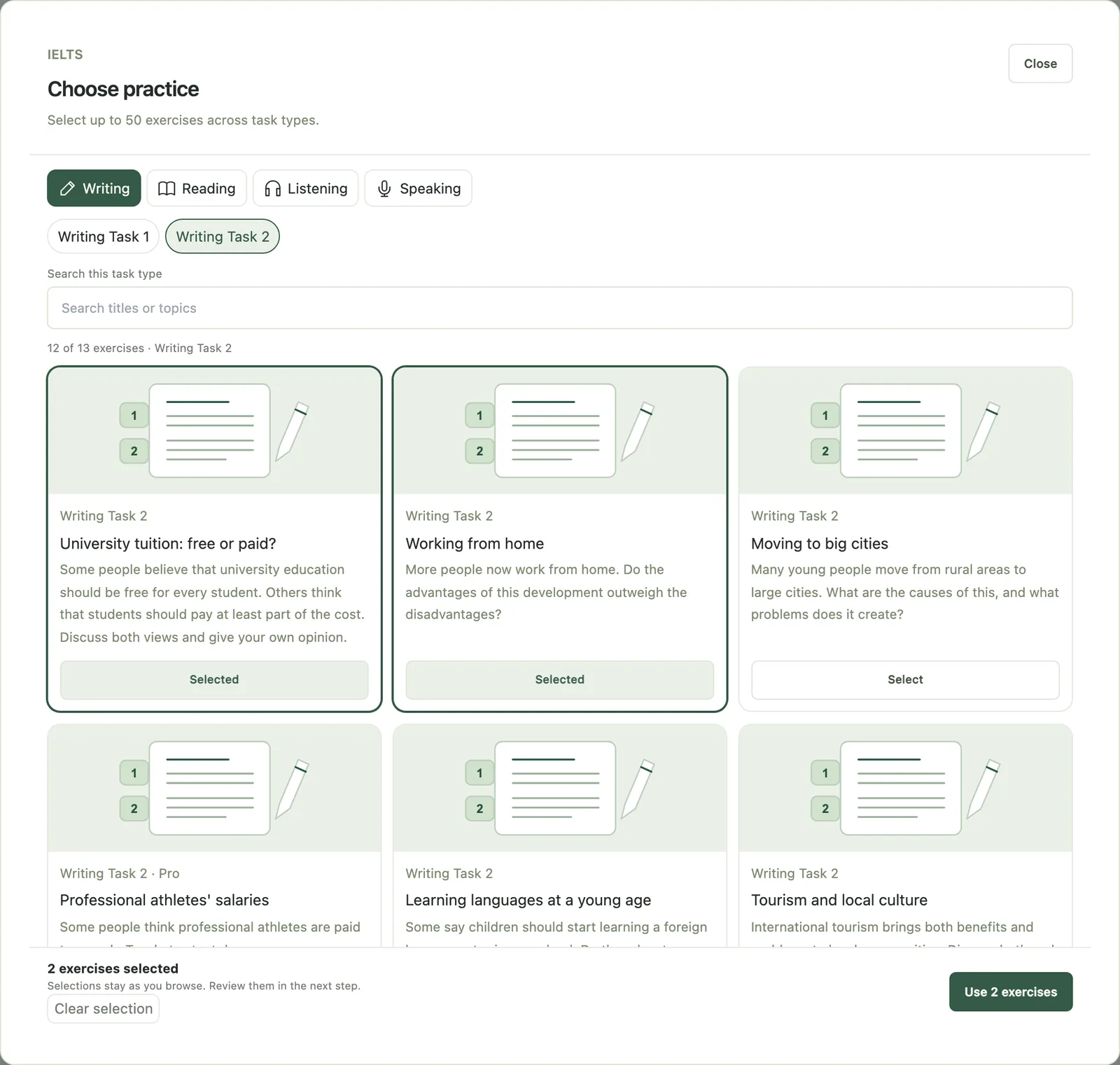
3. Add a due date and the target
In Schedule & note, add a due date and your instructions. Students find the work in the Teacher assignments panel of their Practice Hub, with a notice on their dashboard and a reminder in the in-app bell.
4. See who did it
The Assignment tracker has Active, Past due, Scheduled, Completed, Archived and All tabs. Each student shows as "Completed on time", "Completed late", "Not completed" or "Open". Work counts as complete only when the student's attempt is saved. Follow-ups lists past-due work, pending invitations and students with seven or more days without practice.
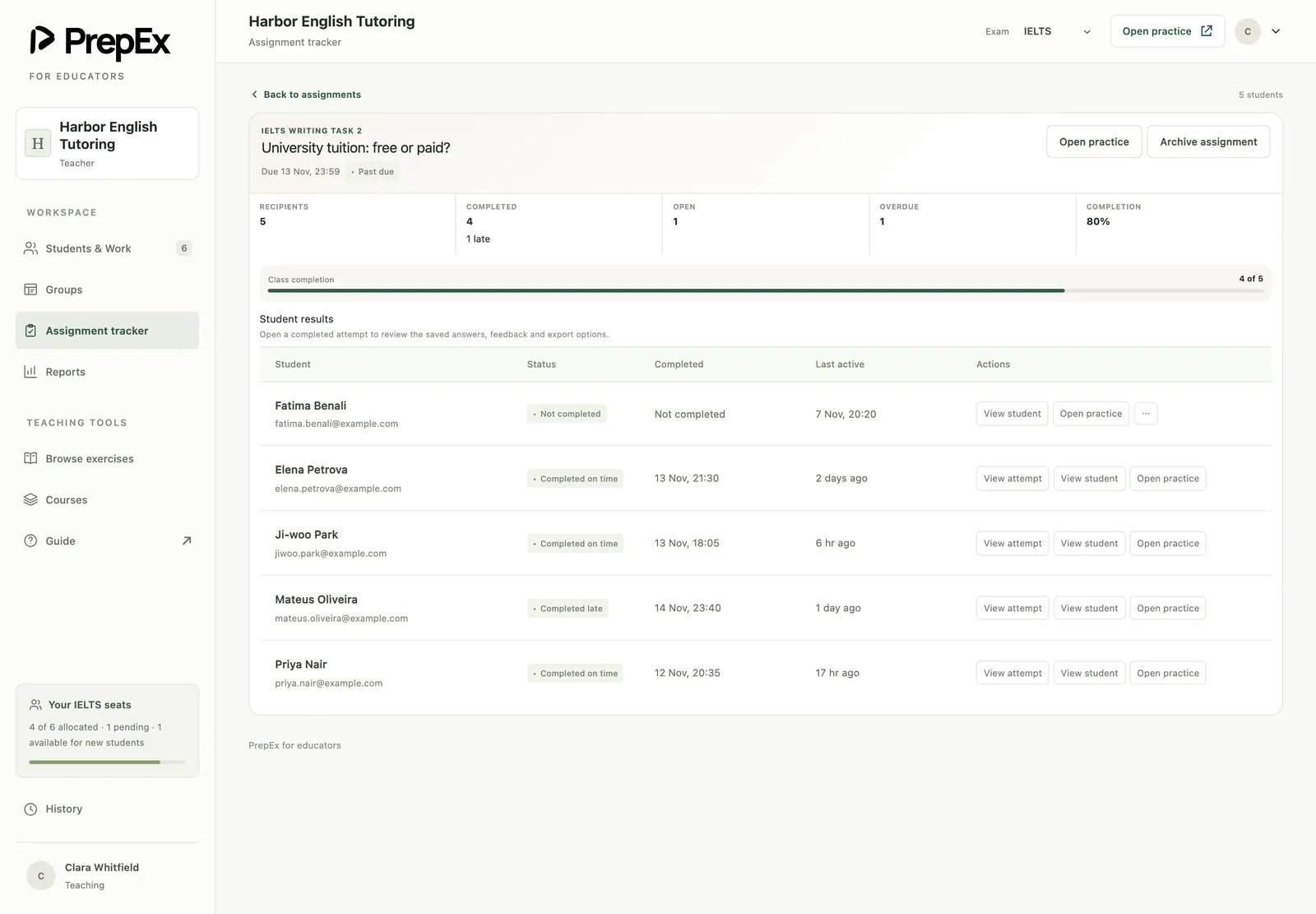
5. Open each answer
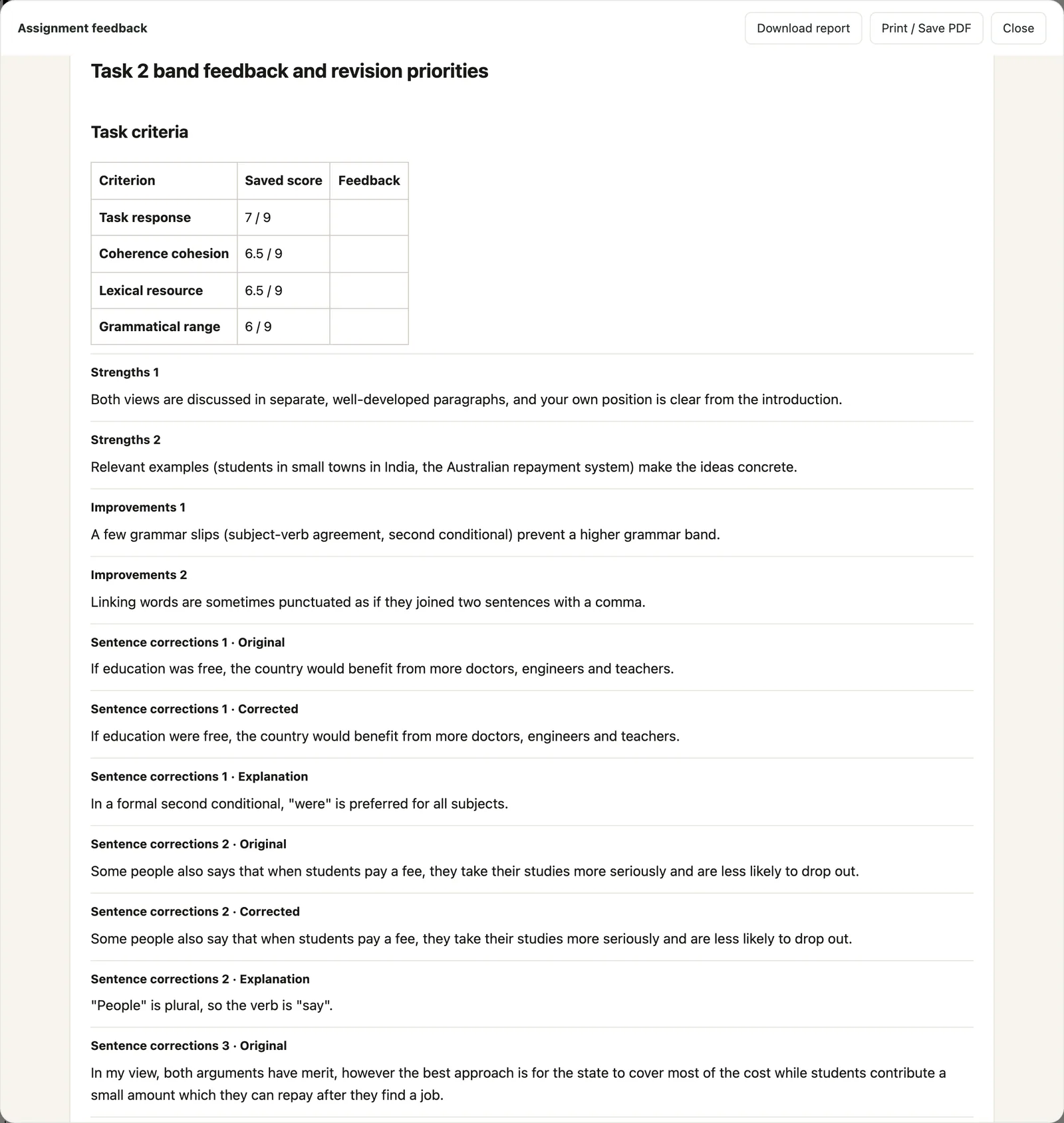
View attempt shows exactly what the student submitted, with PrepEx's AI feedback:
- Writing Task 1 and 2: the prompt, the response, a band for each of the four criteria, and corrections.
- Speaking: a transcript with a band for each criterion.
- Reading and Listening: each answer the student gave next to the correct one.
Writing and Speaking are marked against the public IELTS band descriptors, so every criterion gets a practice band on the 0–9 scale. Download report saves the attempt, and Print / Save PDF prints it. IELTS task practice a student does on their own appears on their Activity tab with its band score.
A 15-minute Friday review
- Open Past due and Follow-ups. Contact anyone who missed work or went quiet.
- Open the week's Writing and Speaking attempts and write down each student's lowest criterion.
- Open each student's Overview and read the trend for each skill in the Progress panel.
- Find the weakness three or more students share. That's next week's lesson, and the matching task is next week's homework.
| Student | Writing Task 2 | Lowest criterion (your note) | Snapshot | Next week |
|---|---|---|---|---|
| Linh | Completed on time | Coherence and Cohesion 5.5 | Writing: Improving | Task 2, target: one idea per paragraph |
| Arjun | Completed late | Lexical Resource 6.0 | Writing: Early stable | Task 2 again before you judge the trend |
| Dilnoza | Not completed | None yet | In Follow-ups: 7 days without practice | A short talk before the next class |
| Rahim | Completed on time | Task Response 6.0 | Speaking under Needs Attention | Speaking Part 2, target: use the full two minutes |
What "Needs Attention" means for your next lesson
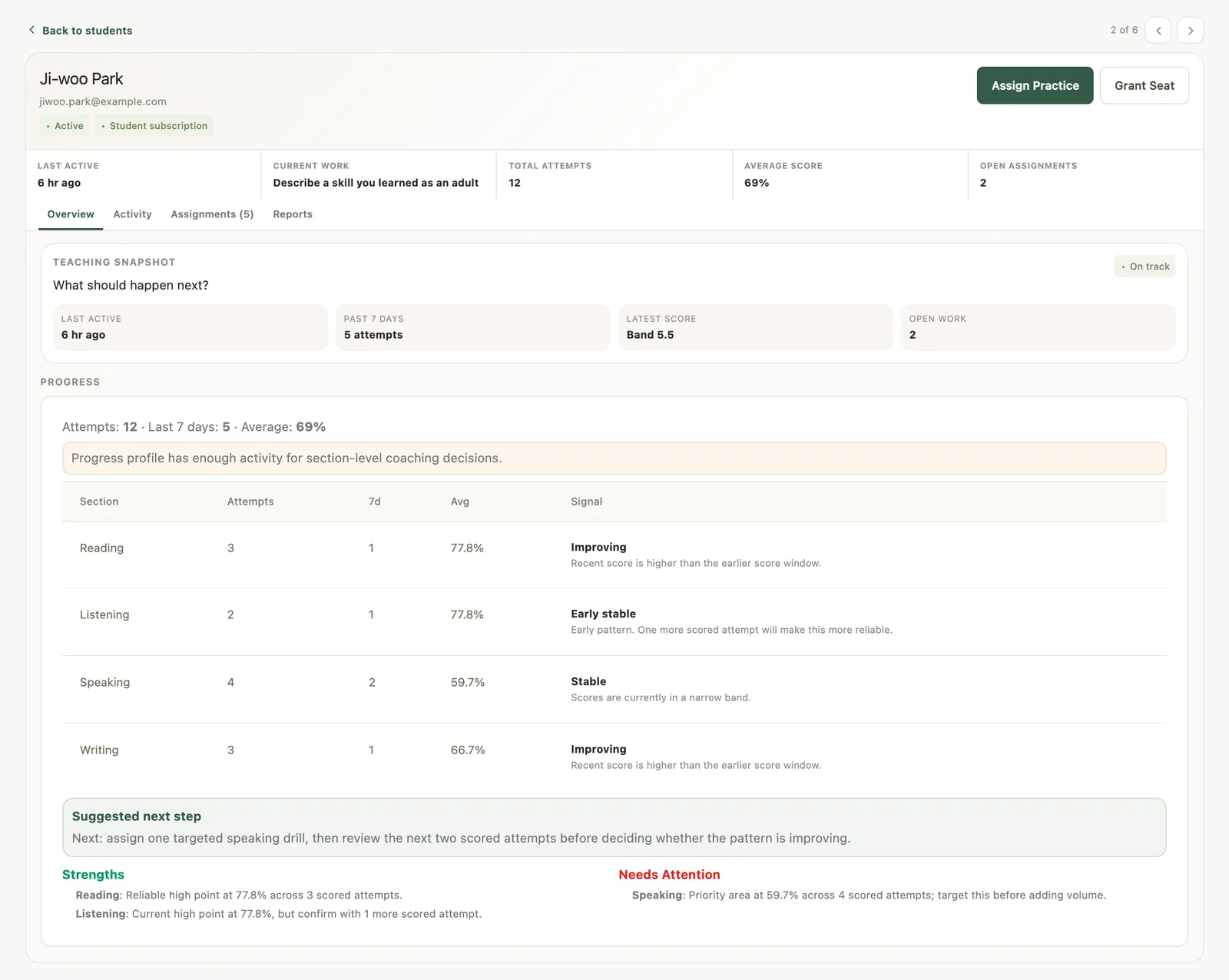
The student's Overview tab opens with a Teaching snapshot, and its Progress panel shows their attempts, attempts in the last 7 days, an average score for each skill (as a percentage) and a trend signal: "Improving", "Declining", "Stable", "Early stable", "First score" or "Needs more data". The trend compares recent scores in a skill with earlier ones, and it counts the task practice students do on their own as well as your homework.
Strengths and Needs Attention each name up to two skills. A skill lands under Needs Attention when its average is low or clearly below the student's other skills. With fewer than three scored attempts it's an early signal; with three or more, it's a priority. The Suggested next step then proposes one targeted task in that skill.
Say Writing sits under Needs Attention after three essays. Don't add more essays yet. Open the three attempts, find the criterion lowest in all of them, teach it in class, and set one Task 2 with that criterion as the target. Check the next two attempts before changing the plan.
The same weekly check, with a tracker template you can copy, is in how to track student progress as a tutor. If some of your students take TOEFL or CELPIP instead, PrepEx's teacher workspace covers TOEFL 2026 and CELPIP as well.
IELTS progress reports for students and parents
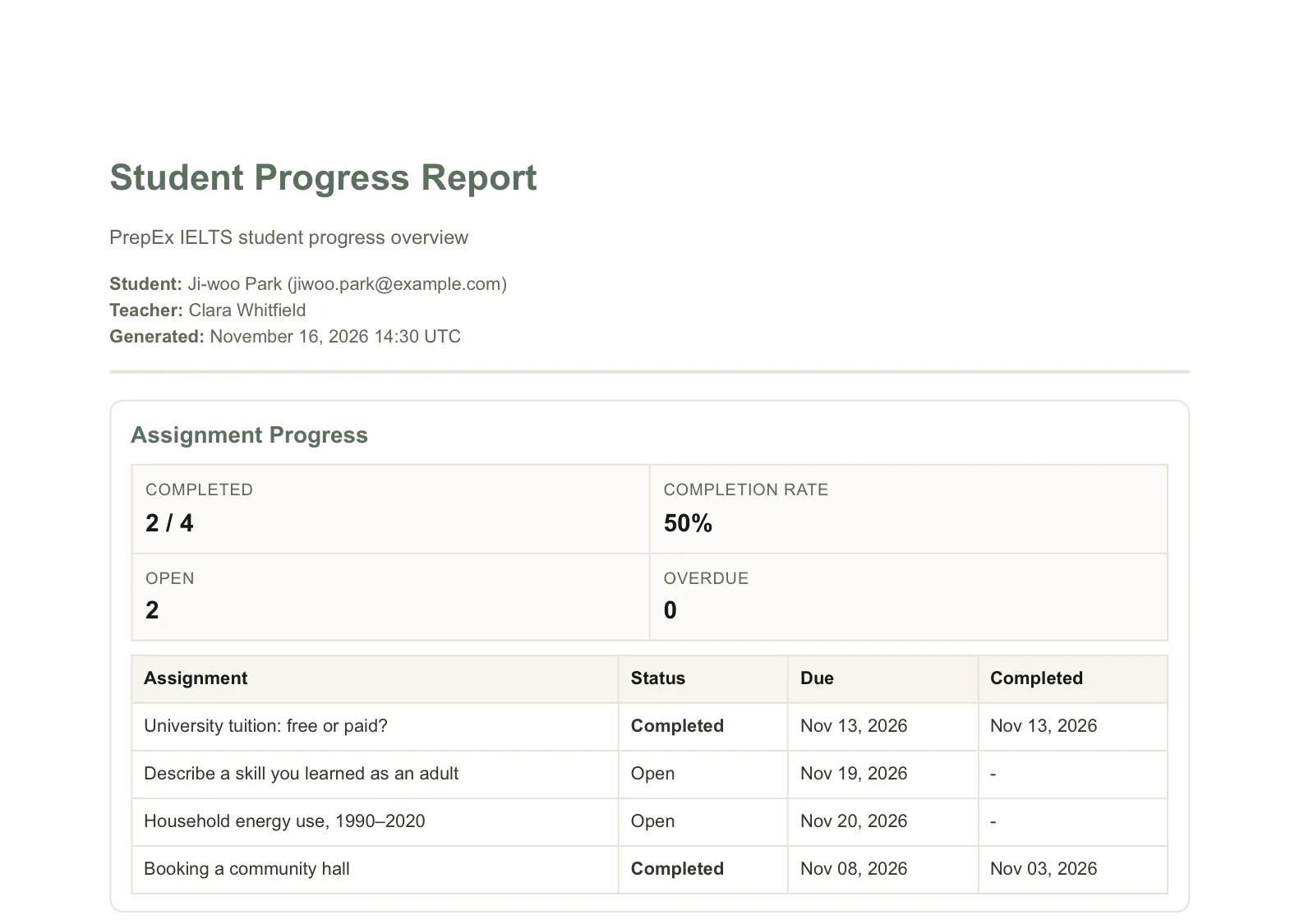
In the student's Reports tab, Export Report PDF creates a Student Progress Report: assignment completion, an overall summary, a breakdown by skill, strengths and focus areas, and your own note and recommendations. You download it and share it yourself.
A good note says where the student is, what changed and what comes next:
Writing has moved from 5.5 to 6.0 over four essays. Coherence and Cohesion is still the lowest criterion, because paragraphs often carry two ideas. Next month: one Task 2 a week with a one-idea-per-paragraph target, and Speaking Part 3 twice a week.
Keep it to one priority.
What to look for in an IELTS homework platform or LMS
- Single tasks by type: Writing Task 1 and 2, each Speaking part, a full Speaking set, Reading passages and Listening sections.
- Due dates, with completion tied to a saved attempt rather than a tick box.
- The student's real answer, with a band for each IELTS criterion.
- Scores from the practice students do between lessons.
- Each skill's direction per student, with a suggested next step.
- A per-student progress report you can download and share.
- Student seats that include full access, so students don't pay separately.
PrepEx does all seven for IELTS.
Free IELTS teacher resources from PrepEx
- IELTS band descriptors explained: the eight criteria and how they become a band, with separate Writing Task 2, Writing Task 1 and Speaking guides that include marked examples and a printable marking sheet.
- Free IELTS Speaking mock test: three timed parts in the browser, no sign-up. Good for a class demo.
- Speaking questions with sample answers for Part 1, Part 2 and Part 3.
- Writing Task 2 and Writing Task 1 practice guides with worked examples.
- The PrepEx teacher guide, a step-by-step tour of the workspace.
IELTS's own teacher resources are listed under Sources.
IELTS homework and progress: common questions
How do I track IELTS student progress?
Track completion, the band trend for each skill and each student's lowest Writing and Speaking criterion, every week. PrepEx collects these for you: the Assignment tracker shows who finished on time, View attempt shows a band for each criterion, and the student's Overview shows each skill's trend.
How do I assign homework to IELTS students?
In PrepEx, open Assign Practice, choose students or a group, pick tasks with Browse exercises, and add a due date and instructions. Set three to six tasks a week, with at least one Writing and one Speaking task, and one target for each.
What is the best platform for an IELTS tutor to assign homework and track student progress?
PrepEx is built for that job. You assign Writing Task 1 and 2, each Speaking part, a full Speaking set, Reading passages and Listening sections with a due date, see who completed them on time, open each essay and Speaking answer with a band for every criterion, and export a progress report for each student.
Is there an IELTS teacher dashboard?
Yes. PrepEx has an IELTS teacher workspace with a student roster, groups, assignments with due dates, an Assignment tracker, attempt review with a band for each criterion, a Teaching snapshot for each student and progress report PDFs.
Which IELTS tasks can I assign in PrepEx?
Eight task types: Writing Task 1, Writing Task 2, Speaking Part 1, Part 2 and Part 3, a full Speaking set, Reading passages and Listening sections.
Can I see my students' IELTS essays and Speaking answers?
Yes, for every task you assign. View attempt shows the essay or Speaking transcript with a band for each criterion, plus corrections on Writing. For task practice students do on their own, you see the band score on their Activity tab.
How do I track IELTS progress across a batch?
Put the batch in a group and assign work to the group. Group cards show completion with open and overdue counts, and the Assignment tracker lists every student's status for each piece of work.
Do my students need to pay for PrepEx?
No. Each student you invite uses one of your seats, and the seat gives them IELTS Pro.
How do I get the PrepEx teacher workspace?
Book a 15-minute walkthrough and the PrepEx team sets up your teacher account and student seats. It works for a solo tutor with a few students or a centre with several classes.
Can I make a progress report for a parent?
Yes. Export Report PDF in the student's Reports tab creates a Student Progress Report with completion, a skill breakdown and your own note and recommendations. You download it and share it.
How is the IELTS overall band calculated?
It's the average of the four skill bands, rounded to the nearest half band. An average ending in .25 rounds up to the next half band and one ending in .75 rounds up to the next whole band, so 6.25 becomes 6.5 and 6.75 becomes 7.0.
Sources
- IELTS: Scoring in detail: bands, overall rounding, criteria
- IELTS Academic Writing format: Task 2 weighting
- IELTS Academic Reading format: 40 questions
- IELTS Writing test resources: band descriptors and scoring videos
- IELTS for teachers: teacher's guide and resources
Keep exploring
More from the journal