The PrepEx Journal
How to Track Student Progress as a Tutor: A 15-Minute Weekly System for TOEFL, IELTS and CELPIP (2026)
To track student progress as a tutor, set a baseline, assign short task sets aimed at the weakest section, and check completion, practice days, section trends and the weakest Writing or Speaking criterion every week. PrepEx's teacher workspace records all of it for TOEFL 2026, IELTS and CELPIP students: who finished on time, each attempt with AI feedback, section trends and a PDF progress report.

On this page
To track student progress as a tutor, check each week what each student did, how it scored and what to set next. PrepEx's teacher workspace keeps that record for tutors teaching TOEFL 2026, IELTS and CELPIP. You assign exact tasks, or full TOEFL and CELPIP practice tests, with a due date, see who finished on time, open each attempt with its AI feedback, and export a progress report for each student.
Let PrepEx keep the tracker for you
Book a 15-minute walkthrough and the PrepEx team sets up your teacher account and student seats for TOEFL 2026, IELTS or CELPIP. Each seat gives that student PrepEx Pro for the exam, so they don't pay separately.
Book a 15-minute walkthrough See what you can assign by exam
Teacher tools by exam The 15-minute weekly check Tracker template What to put in a progress report
We checked the TOEFL, IELTS and CELPIP facts on this page against ETS, IELTS and CELPIP on 16 November 2026, and the teacher features against the PrepEx workspace the same day.
The short answer
Track four things for every student each week: whether the set work was done on time, how often they practiced, the score trend in each section, and their weakest Writing or Speaking criterion. Start with a baseline, assign short task sets aimed at the weakest section, and run a full-test checkpoint every three to five weeks. PrepEx's teacher workspace shows all four for TOEFL 2026, IELTS and CELPIP students, so the weekly review takes about 15 minutes.
What you can assign and track in PrepEx, by exam
PrepEx's teacher workspace is open to TOEFL 2026, IELTS and CELPIP tutors the PrepEx team sets up. The weekly system on this page works the same way for all three. What changes is the work you can assign and the score you read on each attempt.
| Exam | What you can assign | What you see on each attempt | Exam guide |
|---|---|---|---|
| TOEFL 2026 | Any of the 12 task types, or a full TOEFL 2026 practice test | The response with AI feedback and corrections; a full test gives a 1–6 practice estimate for each section and overall | TOEFL for teachers; TOEFL platforms for tutors, compared |
| IELTS | Writing Task 1 and 2, Speaking Parts 1, 2 and 3, a full Speaking set, Reading passages and Listening sections | The essay or Speaking transcript with a band for each criterion, plus corrections | IELTS homework and band tracking |
| CELPIP-General | Any of the 20 task types, or a full CELPIP practice test | Writing and Speaking levels on CELPIP's four rating dimensions; Reading and Listening answers against the key | CELPIP for teachers |
For all three you get the Assignment tracker, a Teaching snapshot for each student, groups, Courses and a Student Progress Report PDF.
Students preparing for PTE Academic or the Duolingo English Test can practice on their own with PrepEx's PTE practice tests and Duolingo English Test practice tests. If a student is still choosing an exam, our test comparison sets the five side by side.
What to measure each week
Exam practice produces plenty of numbers. These six tell you what to teach next.
| Signal | How to read it | What you do about it |
|---|---|---|
| Completion: on time, late or missing | One late task is noise. Late or missing work two weeks running usually means the load is wrong or confidence is slipping. | Shrink next week's set to what they will finish, and ask why before adding more. |
| How often they practiced in the last 7 days | Count sessions, not hours. A drop from four sessions a week to one often comes before a student goes quiet. | A short check-in that week, not extra homework. |
| Trend in each section | Compare each section with itself over time. A TOEFL overall of 4.5 can hide Writing at 3.5. | Put most of next week's set into the section that is flat or falling. |
| Weakest Writing and Speaking criterion | IELTS marks Writing and Speaking on four criteria each. The same low criterion across three attempts is a teaching target; one low score isn't yet. | Write one instruction aimed at it ("one main idea per paragraph") and attach it to the next task. |
| Repeat errors | The same correction coming back (dropped articles, the wrong tense) or the same task type going wrong week after week. | Teach it once to everyone who shares it, then assign two or three tasks of that type. |
| Checkpoint result against the target | A timed full test every three to five weeks, compared section by section with the last one. | Keep the plan, move the focus to another section, or talk about the test date. |
What to ignore
- Hours on a platform. A student can keep a tab open for an hour and finish nothing.
- Scores on material the student has seen before. A second try at the same reading passage measures memory.
- One big jump. Wait for two or three scores in the same direction before you change the plan.
The system: baseline, targeted sets, checkpoints
1. Baseline in the first week
For TOEFL, assign one full TOEFL 2026 practice test. Since 21 January 2026, ETS reports each of the four sections and the overall score on a 1–6 scale in half-point steps, and the overall is the average of the four sections rounded to the nearest half band. A baseline on the same scale shows which section is pulling the overall down.
For IELTS, assign one of each: Writing Task 2, a full Speaking set, a Reading passage and a Listening section. That gives you a band for each skill, and a band for each Writing and Speaking criterion. Ask students to do it timed.
For CELPIP, assign one full CELPIP practice test. The level for each skill shows which one sits furthest below the student's CLB target.
2. A targeted set every week
Assign three to six tasks aimed at the lowest section, due two days before your next lesson so you have time to look. Add one line of instruction naming the single thing to work on. Keep the set small enough that everyone finishes it.
3. A checkpoint every three to five weeks
Repeat the baseline with new material: a second full TOEFL or CELPIP practice test, or a fresh IELTS set with one task from each skill. Plan the last checkpoint about two weeks before the exam, early enough to change the final lessons.
The 15-minute weekly check
- Minutes 0–3: who didn't do the work. List late and missing tasks and anyone who hasn't practiced for a week. Send each a one-line note through the channel you already use.
- Minutes 3–10: one attempt per student. Open the lowest-scoring Writing or Speaking attempt of the week. Note the lowest criterion and one repeated correction.
- Minutes 10–13: section trends. Mark any section that has been flat or falling for two weeks.
- Minutes 13–15: next week's set. Assign it with a due date and one instruction based on what you just read.
That fits 8 to 12 students. With more, split them into groups and check each group on a different day.
A sample four-week plan
Two invented students: Mai is preparing for TOEFL with a target of 5.0, and Rahul for IELTS Academic with a target of 6.5. To see the tasks your students would work on, look at the TOEFL 2026 practice test and IELTS Writing Task 2 practice.
| Week | Mai (TOEFL, lowest: Writing) | Rahul (IELTS, lowest: Writing) | What you check |
|---|---|---|---|
| 0 (baseline) | One full TOEFL 2026 practice test | Writing Task 2, full Speaking set, one Reading passage, one Listening section | Lowest section; lowest Writing and Speaking criterion |
| 1 | 2 Academic Discussion, 1 Email Writing, 3 Build a Sentence | 2 Writing Task 2, 1 Speaking Part 3 | Done on time? Same criterion still lowest? |
| 2 | 2 Academic Discussion, 2 Email Writing | 1 Writing Task 1, 2 Writing Task 2 | First Writing trend; any new repeat error |
| 3 | 1 Academic Discussion, 2 Interview Speaking, 2 Listen and Repeat | 1 Writing Task 2, 1 Speaking Part 2, 1 Speaking Part 3 | Practice days; has the target criterion moved? |
| 4 (checkpoint) | A second full TOEFL 2026 practice test | A new set with one task from each skill, as in week 0 | Change in each section since week 0; write the progress report |
Both were lowest in Writing at baseline and next-lowest in Speaking, so Writing takes most of each set and Speaking comes in by week 3. For exam-specific plans, see TOEFL for teachers, IELTS homework and band tracking and the six-week plan in CELPIP for teachers.
A student progress tracker template
If you keep your tracker in a spreadsheet or a notebook, use one row per student per week with these columns. The sample rows are invented.
| Student, exam, target, test date | Set this week | Status | Last checkpoint by section | Trend | Weakest criterion or repeat error | Days practiced (last 7) | Next action |
|---|---|---|---|---|---|---|---|
| Mai, TOEFL, 5.0, 12 Dec | 2 Academic Discussion, 2 Email Writing | All on time | R 5.0, L 4.5, S 4.0, W 3.5 | Writing task scores up two weeks running | Drops articles; repeats the professor's question | 4 | One Academic Discussion: "Use one example from your own life" |
| Rahul, IELTS Academic, 6.5, 20 Jan | 2 Writing Task 2, 1 Speaking Part 3 | 1 late, 1 missing | W 5.5, S 6.0 | Writing flat | Coherence and Cohesion: two ideas per paragraph | 2 | Ask about the missed Part 3; one Task 2 with "one idea per paragraph" |
| Leila, IELTS Academic, 7.0, 3 Feb | 3 Reading passages | Not started | R 6.5 | No new scores | None yet | 0 | Quiet for 8 days: contact today |
Filling these columns by hand is what takes the time: copying scores, checking who submitted, finding last week's essay.
What to look for in a student progress tracker for exam tutors
Tutoring business software usually covers lessons, scheduling and billing. For exam students you need a tool that sees the work itself:
- Completion tied to a submitted attempt, not a box the student ticks.
- Assignments by exact task type, with a due date and your own instructions.
- The student's actual response with scored feedback for each assigned task.
- A trend for each section, so a weak section can't hide in the overall.
- Flags for past-due work and for students who stop practicing.
- A progress report for each student that you can add your own note to.
- Student access included, so nobody skips homework because they haven't paid for the tool.
PrepEx's teacher workspace does all seven for TOEFL 2026, IELTS and CELPIP.
How PrepEx tracks student progress for you
Once the PrepEx team has set up your account, you invite students by email, one at a time or in a batch. Each student clicks Accept Invite and takes a seat. The teacher guide covers every screen; these are the parts you'll use each week.
Assign the work
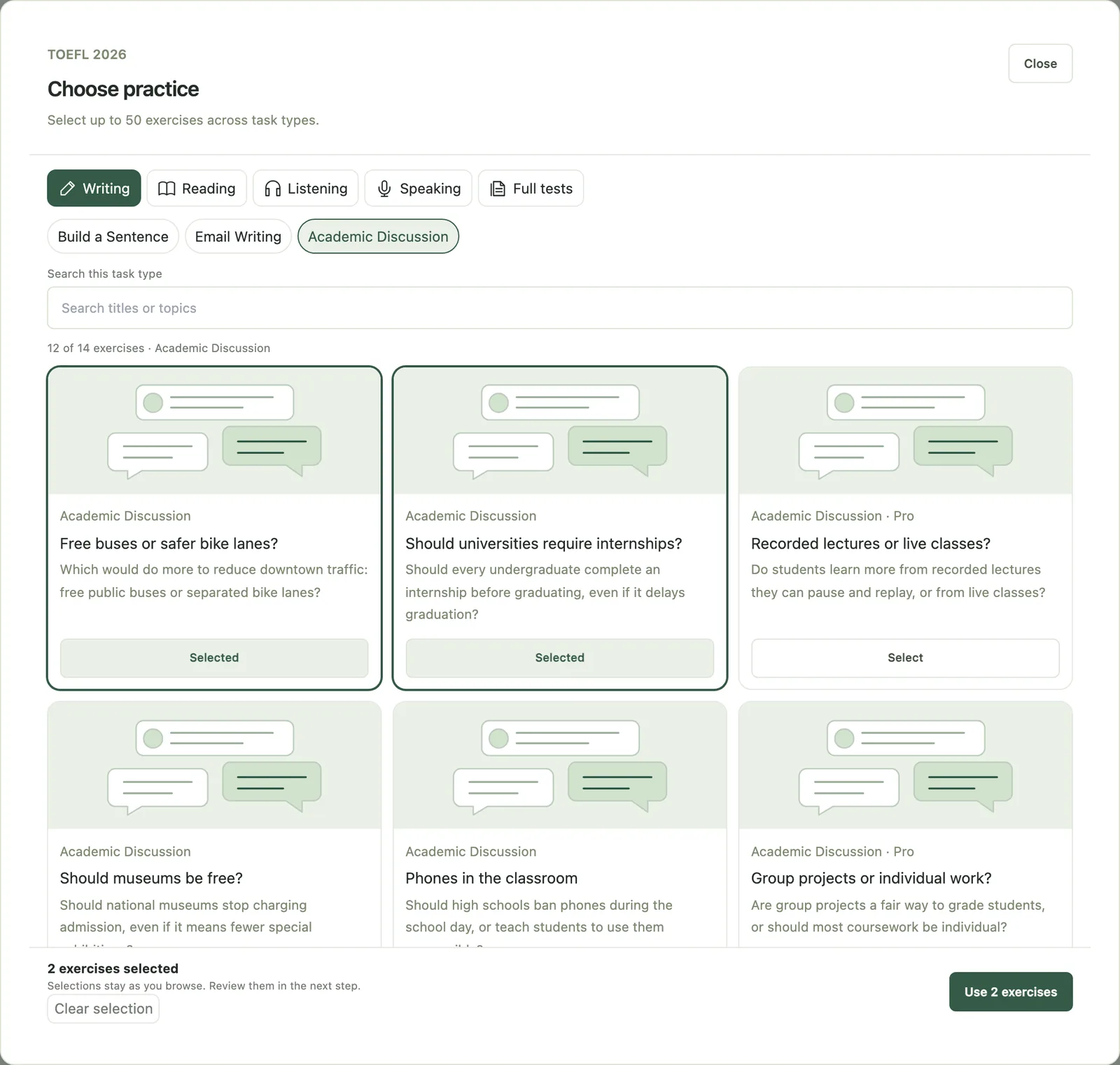
Assign Practice has three steps: choose the Students (one, several or a group), choose the Practice in Browse exercises, then set a due date and instructions under Schedule & note. One assignment can hold up to 50 exercises.
- TOEFL 2026: all 12 task types, from Build a Sentence and Academic Discussion to Listen and Repeat and Interview Speaking, plus full TOEFL 2026 practice tests under Full tests.
- IELTS: Writing Task 1, Writing Task 2, Speaking Part 1, Part 2 and Part 3, a full Speaking set, Reading passages and Listening sections.
- CELPIP: all 20 CELPIP-General task types, plus full CELPIP practice tests.
Students see new work in the Teacher Assignments panel of their Practice Hub, with a notice on their dashboard and an in-app reminder. To plan several weeks ahead, Courses hold a multi-session plan with a date for each session.
See who did it
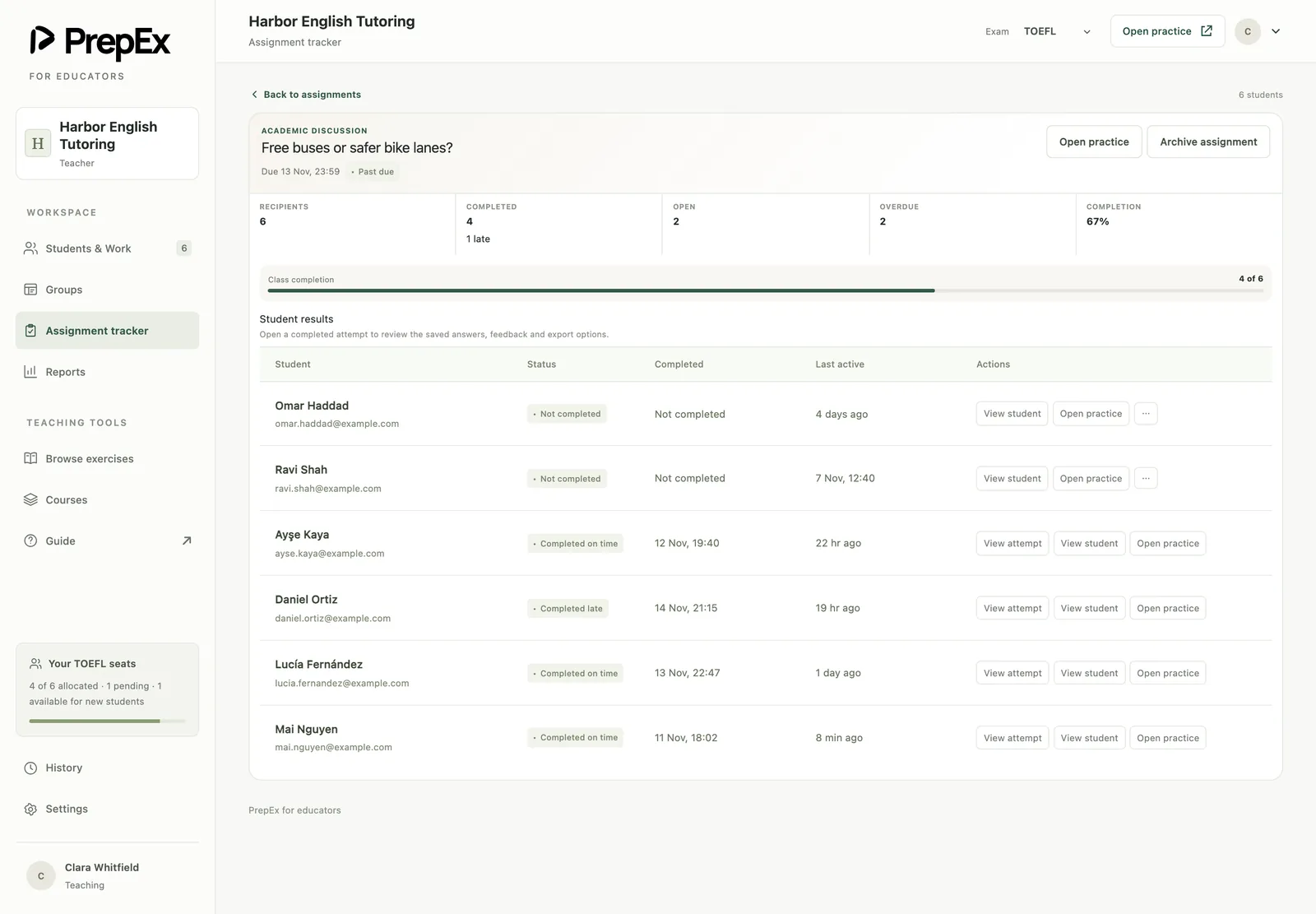
The Assignment tracker lists each piece of work with every student's status: "Completed on time", "Completed late", "Not completed" or "Open". Work counts as done only when the student has a saved attempt for it. Its Past due tab covers minutes 0–3 of the weekly check.
Follow-ups flags past-due work, invitations still waiting, and students with 7 or more days without practice. For groups, each group card shows completion and how much work is open or overdue.
Open each attempt
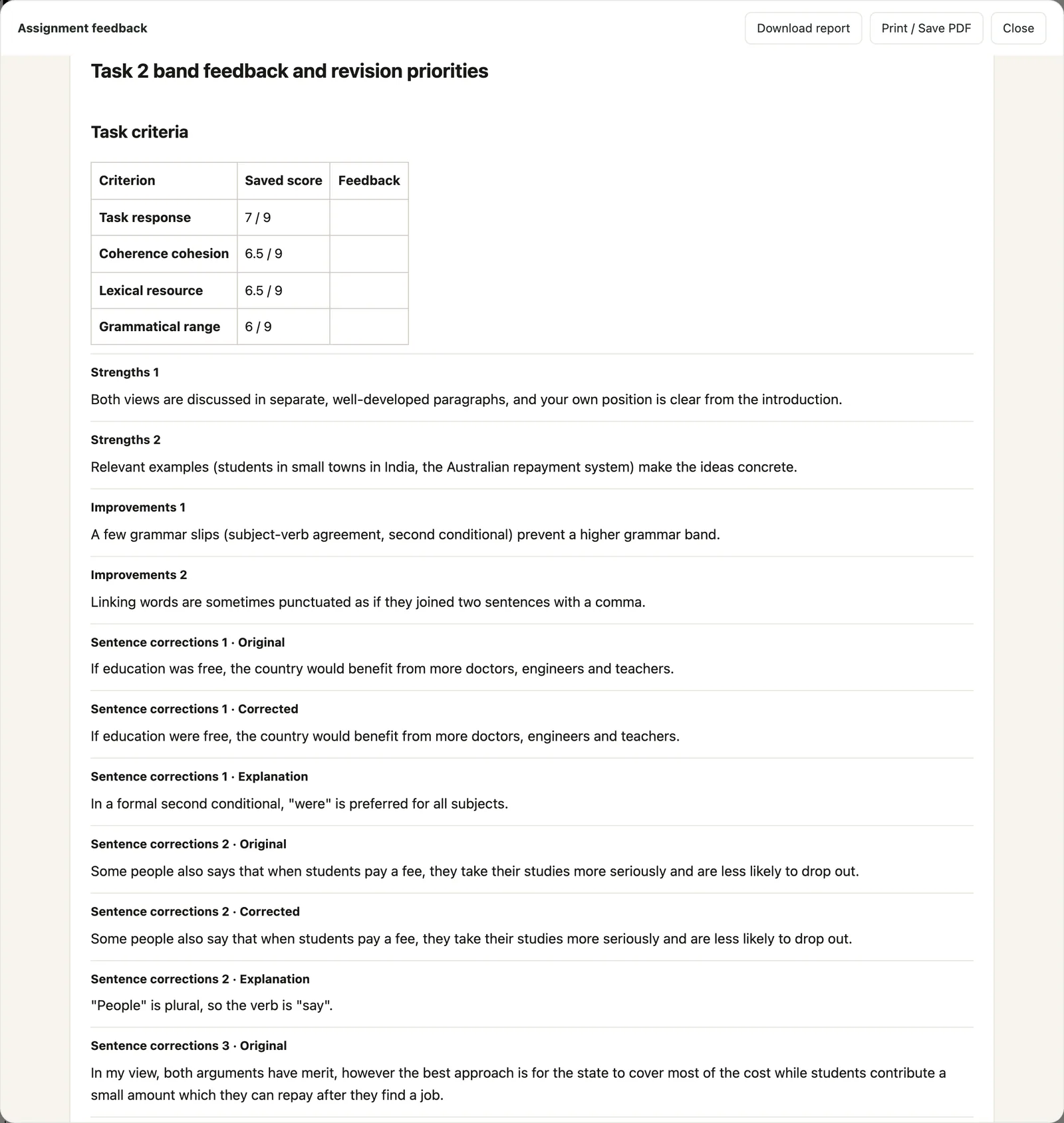
View attempt shows exactly what the student submitted on an assigned task, with PrepEx's AI feedback:
- TOEFL: essay text with rubric feedback and corrections, or objective answers checked against the key with explanations.
- IELTS: the response with a band for each criterion (Task Achievement or Task Response, Coherence and Cohesion, Lexical Resource, Grammatical Range and Accuracy) and corrections. For Speaking, the transcript with a band for Fluency and Coherence, Lexical Resource, Grammatical Range and Accuracy, and Pronunciation.
- CELPIP: Reading and Listening answers against the key with explanations; Writing and Speaking with a level for each of CELPIP's four rating dimensions and written feedback.
Those are the four IELTS assessment criteria, which our band descriptors guide explains with marked essays. For an assigned full TOEFL practice test, View test results opens the student's saved result with a 1–6 practice estimate, and for a full CELPIP test, a practice level range.
You also see practice students do on their own: scores and saved responses for TOEFL, band scores from task practice for IELTS, and task scores and full-test reports for CELPIP.
Read the Teaching snapshot
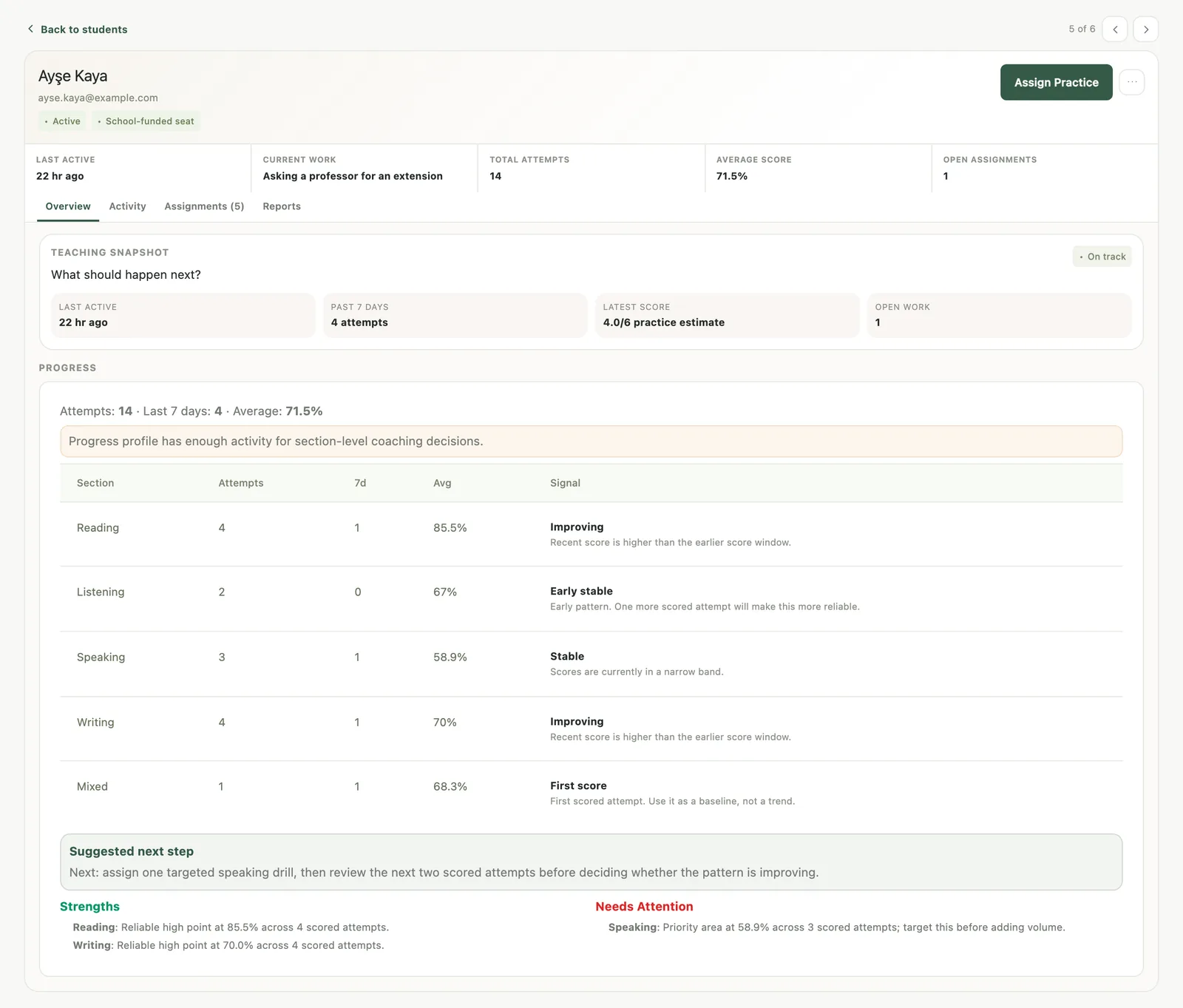
Each student's Overview tab opens with a Teaching snapshot (last active, practice in the past 7 days, latest score and open work), and below it a Progress panel: total attempts, attempts in the last 7 days, the average for each section as a percentage and a trend label. PrepEx compares recent scores in a section with earlier ones and labels it "Improving", "Declining" or "Stable", or "First score" and "Needs more data" when there isn't enough yet. Below are Strengths, Needs Attention and a Suggested next step.
Needs Attention names up to two sections that sit low, either outright or against the student's own average. With fewer than three scored attempts it's an early signal: assign a short drill in that section and look again after two more scores. With three or more, that section takes most of next week's set. If it's Writing, open the lowest Writing attempt before the lesson, find the criterion behind the score, and teach that.
What to put in a progress report for a student or parent
A useful report answers four questions: what was set and done, where the student is now, which way each section is moving, and what happens next.
- Work completed: tasks assigned, done on time, done late, missed.
- Current level by section, against the target score.
- Direction since the last report, section by section.
- One or two strengths, with the evidence.
- One focus area, with the reason in plain words.
- The plan for the next three to four weeks, including what the student does between lessons.
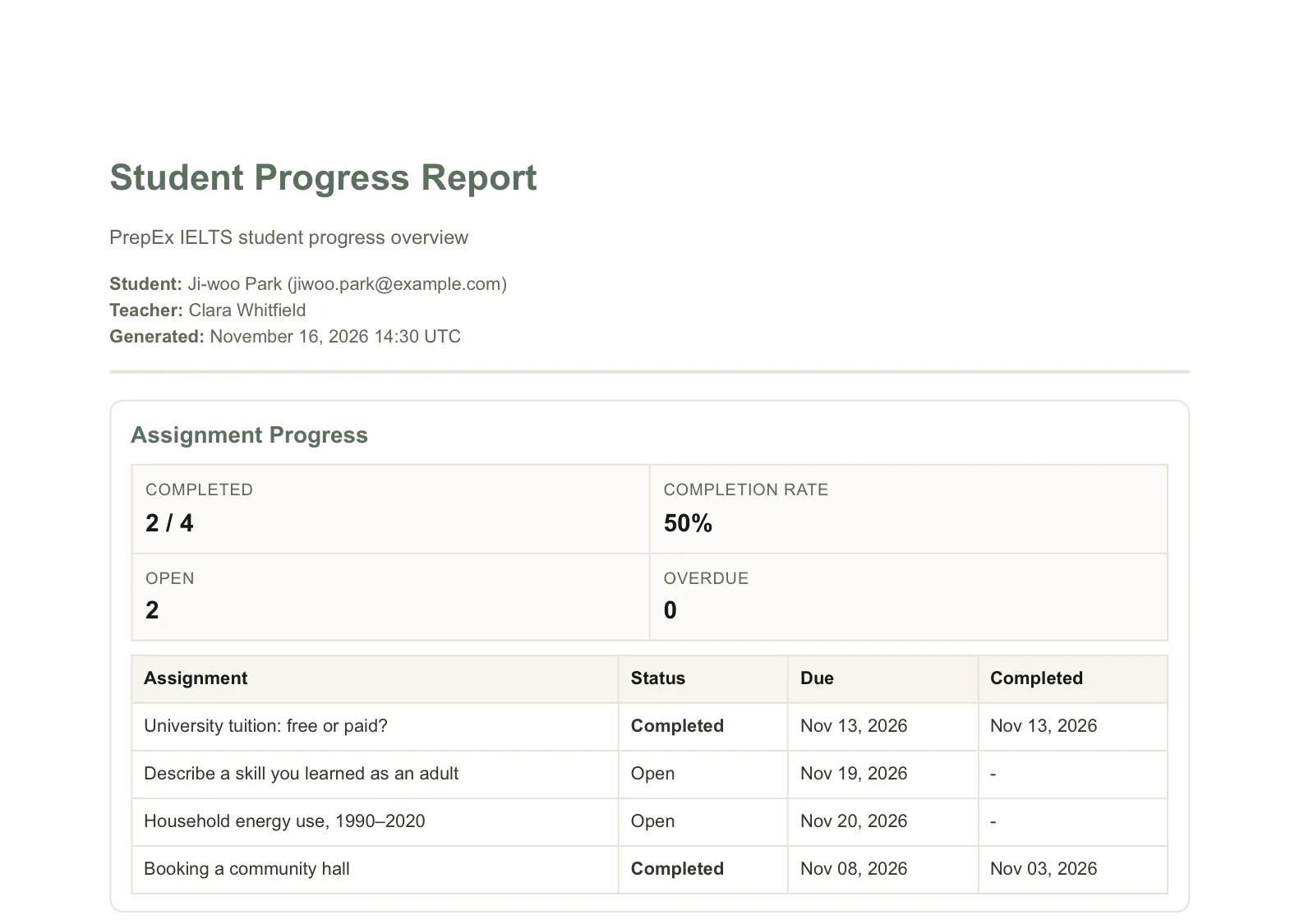
In PrepEx, open the student's Reports tab and click Export Report PDF. The Student Progress Report covers assignment completion, an overall summary, a section breakdown, and strengths and focus areas. Before you export, add a Teacher note and Recommendations, one per line. You download the PDF and share it yourself, so you decide who gets it and when.
A sample teacher note for a parent:
Rahul finished 7 of 9 tasks this month, 2 of them late. His Writing practice band has stayed at 5.5, and Coherence and Cohesion is what holds it there: most paragraphs carry two ideas, so the argument is hard to follow. For the next three weeks he'll write one Task 2 essay a week with one main idea per paragraph, and we'll compare in the week of 15 December.
Tracking student progress: common questions
How do you track student progress as a tutor?
Set a baseline, assign a short targeted set each week, and run a full-test checkpoint every three to five weeks, checking completion, practice frequency, section trends and the weakest criterion as you go. PrepEx's teacher workspace shows all of this for TOEFL 2026, IELTS and CELPIP students from the work they submit.
What software can I use to track student progress?
For TOEFL, IELTS and CELPIP students, PrepEx's teacher workspace tracks progress from the exam work itself: completion against due dates, each attempt with AI feedback, a trend label for each section and a Student Progress Report PDF.
How do I assign practice tests to students online?
In PrepEx, click Assign Practice, choose the students or a group, pick the tasks or a full test in Browse exercises, and set a due date and instructions. For TOEFL 2026 you can pick any of the 12 task types or a full practice test. For IELTS, pick from eight task types, Writing Task 1 to a full Speaking set. For CELPIP, pick any of the 20 task types or a full practice test.
What should a tutoring progress report include?
Work completed, the current level in each section against the target, the direction since the last report, one or two strengths, one focus area and the plan until the next report. PrepEx's Student Progress Report PDF fills in completion, a section breakdown, strengths and focus areas; you add the plan in your teacher note and recommendations.
How can I tell if a student is falling behind before the exam?
Watch for late or missing work two weeks running, less frequent practice, or a week with no practice at all. In PrepEx, Follow-ups lists past-due work and students who have gone 7 or more days without practice.
Can I see exactly what my student submitted?
Yes, for each assigned task. In PrepEx, View attempt opens the student's response with the AI feedback, including a band for each criterion on IELTS Writing and Speaking.
Do my students need to buy their own PrepEx plan?
No. Each student you invite uses one of your seats, and the seat gives them PrepEx Pro for that exam.
How do I get a PrepEx teacher account?
Book a 15-minute walkthrough and the PrepEx team sets up your teacher account and student seats. You then invite students by email, singly or in a batch, and each joins by clicking Accept Invite. It works for a solo tutor with a handful of students as well as for a school.
Which exams does the PrepEx teacher workspace cover?
TOEFL 2026, IELTS and CELPIP, for every tutor the PrepEx team sets up after a 15-minute walkthrough. Each has its own guide: TOEFL for teachers, IELTS homework and band tracking and CELPIP for teachers. Students preparing for PTE Academic or the Duolingo English Test can practice on their own with PrepEx practice tests.
Can I assign a different practice test to each student?
Yes, for TOEFL 2026 and CELPIP. In PrepEx, open Assign Practice, choose one student, pick a full TOEFL 2026 or CELPIP practice test from the Full tests tab and add a due date, then repeat for the next student with a different test. IELTS full tests can't be assigned, so give each IELTS student their own set of Writing, Speaking, Reading and Listening tasks.
Is there a free student progress tracker template?
Yes. Copy the columns from the tracker template on this page into a spreadsheet or notebook: one row per student per week, with the set work, status, last checkpoint by section, trend, weakest criterion, practice days and next action. PrepEx's teacher workspace shows most of the same information from the work students submit, so you don't fill it in by hand.
Can I track a whole class at once?
Yes. In PrepEx, put students in a group and assign work to the whole group in one step. Each group card shows completion and how much work is open or overdue, and the Assignment tracker still lists each student's status.
Sources
- ETS: TOEFL iBT test content: the four sections and their task types; section and overall scores on the 1–6 scale
- ETS: Understanding your TOEFL iBT scores: the 1–6 scale in half-point increments from 21 January 2026; the overall is the average of the four sections, rounded to the nearest half band
- IELTS: Scoring in detail: the 0–9 band scale and the four Writing and four Speaking assessment criteria
- CELPIP: CELPIP-General: the four components and their 20 parts and tasks
- CELPIP: Test Results: CELPIP levels and the four Writing and Speaking rating dimensions
Keep exploring
More from the journal