The PrepEx Journal
Best TOEFL Platforms for Tutors and Schools in 2026: Assign Practice and Track Progress
PrepEx is the TOEFL 2026 platform we recommend for tutors and schools: assign any of the 12 task types or a full practice test, open each student's attempt with AI feedback, and track who finished on time. Here's how it compares with Magoosh, Arno, PrepDrills and TestGlider, from each platform's own pages on 16 November 2026.

On this page
PrepEx is the TOEFL 2026 platform we recommend for tutors and schools. You can assign any of the 12 TOEFL 2026 task types or a full practice test to one student or a whole group. Then you open each student's attempt with PrepEx's AI feedback and see in one tracker who finished on time, who finished late and who hasn't finished. Below, PrepEx is compared with Magoosh, Arno, PrepDrills and TestGlider on the jobs a TOEFL tutor does every week.
A TOEFL teacher workspace, set up for you
Book a 15-minute walkthrough and the PrepEx team sets up your teacher account and student seats. Each seat gives a student PrepEx TOEFL Pro, so your students don't pay separately.
Short answer Comparison table Which one fits you Checklist FAQ
We checked the TOEFL facts on this page against ETS on 16 November 2026, each platform's teacher or school page the same day, and the PrepEx teacher features against the PrepEx workspace.
The short answer
For a TOEFL tutor in 2026, pick PrepEx. Going by each platform's own pages on 16 November 2026, it's the only one here whose pages describe all four jobs a tutor needs. You can assign a single TOEFL 2026 task type or a full practice test, open each student's response with the AI feedback, track on-time and late completion, and export a progress report for each student. Students join by email and use a seat that gives them PrepEx TOEFL Pro.
How we compared the platforms
A tutor's week has the same steps: choose the work, send it, check it, chase the students who didn't do it, and tell someone how it's going. The comparison follows those steps:
- TOEFL 2026 coverage. The test has 12 task types across Reading, Listening, Writing and Speaking. Reading and Listening adjust to each student's level, and since 21 January 2026 scores are reported on a 1–6 scale in half-point steps. Practice written for the older test won't match what your students will see.
- Assign one task type. Can you send a student Academic Discussion practice and nothing else?
- Assign a full practice test. Can you set a full test as a checkpoint and see the result?
- Open each student's answer and feedback. The essay or spoken response and the feedback on it, not only a score.
- Due dates and completion. Does the platform tell you who finished on time, who was late and who didn't finish?
- Progress report. A per-student report you can hand to a student or a parent.
- How students get access. Whether students need their own paid plan.
We read each platform's teacher or school page on 16 November 2026 and filled the table only from what those pages say. If a page doesn't mention a feature, the cell says "Not stated on its site". Platforms whose sites showed no teacher or class feature for TOEFL that day aren't in the table. ETS's own free teacher resources are covered after the platform cards. Prices aren't part of the comparison.
TOEFL teacher platforms compared
| Platform | TOEFL 2026 coverage | Assign one task type | Assign a full practice test | Open each student's answer and feedback | Due dates and completion | Progress report | How students get access |
|---|---|---|---|---|---|---|---|
| PrepEx | All 12 task types plus full TOEFL 2026 practice tests | Yes, any of the 12, to one student, several or a group | Yes, with results as a 1–6 practice estimate | Yes: the response, AI feedback and corrections | Optional due date; completed on time, completed late or not completed | Student Progress Report PDF for each student | Email invitation; a seat gives the student PrepEx TOEFL Pro |
| Magoosh (Educator Portal) | Officially licensed ETS content, "Updated for the 2026 TOEFL" | "Assign specific content" | Not stated on its site (students get up to 10 full-length tests) | Not stated on its site (shows performance across the four skills and estimated scores) | Due dates; "track completion automatically" | "Export detailed reports" | Accounts you buy for your students; the portal comes with purchases of at least ten accounts |
| Arno (Teacher Hub) | Practice and mock tests that "closely match the current TOEFL iBT" | Not stated on its site (it builds AI study plans) | Not stated on its site (students get mock tests) | Not stated on its site (dashboards show "activity, scores, and areas for improvement") | Study-plan days due and completed, in its example report | "Downloadable reports" | Student seats you buy for your students |
| PrepDrills (for Schools) | "Every 2026 TOEFL task type" plus timed practice tests | "Assign practice and homework" | Not stated on its site (students get timed practice tests) | Not stated on its site (teachers monitor "student activity and bands") | Not stated on its site (teachers "see who is on track at a glance") | "Export progress reports" | Managed seats bought by the institution; "students never pay" |
| TestGlider (for Institutions) | 2026 TOEFL practice by task type and mock tests | Not stated on its site (institutions assign access) | Not stated on its site (students get mock tests) | Not stated on its site ("View detailed test history") | Not stated on its site | "Export data for reporting" | Access bought by the institution, then activated by each student |
The PrepEx row describes the PrepEx teacher workspace. The other rows quote or closely paraphrase each platform's own teacher or school page, as described on its site on 16 November 2026.
The platforms, one at a time
1. PrepEx: assign, review and report on TOEFL 2026 work
Everything happens in the PrepEx teacher workspace. Click Invite Student and enter one email or paste a batch. Each student gets an email with an Accept Invite button; accepting puts them on your roster and uses one of your seats, which gives them PrepEx TOEFL Pro.
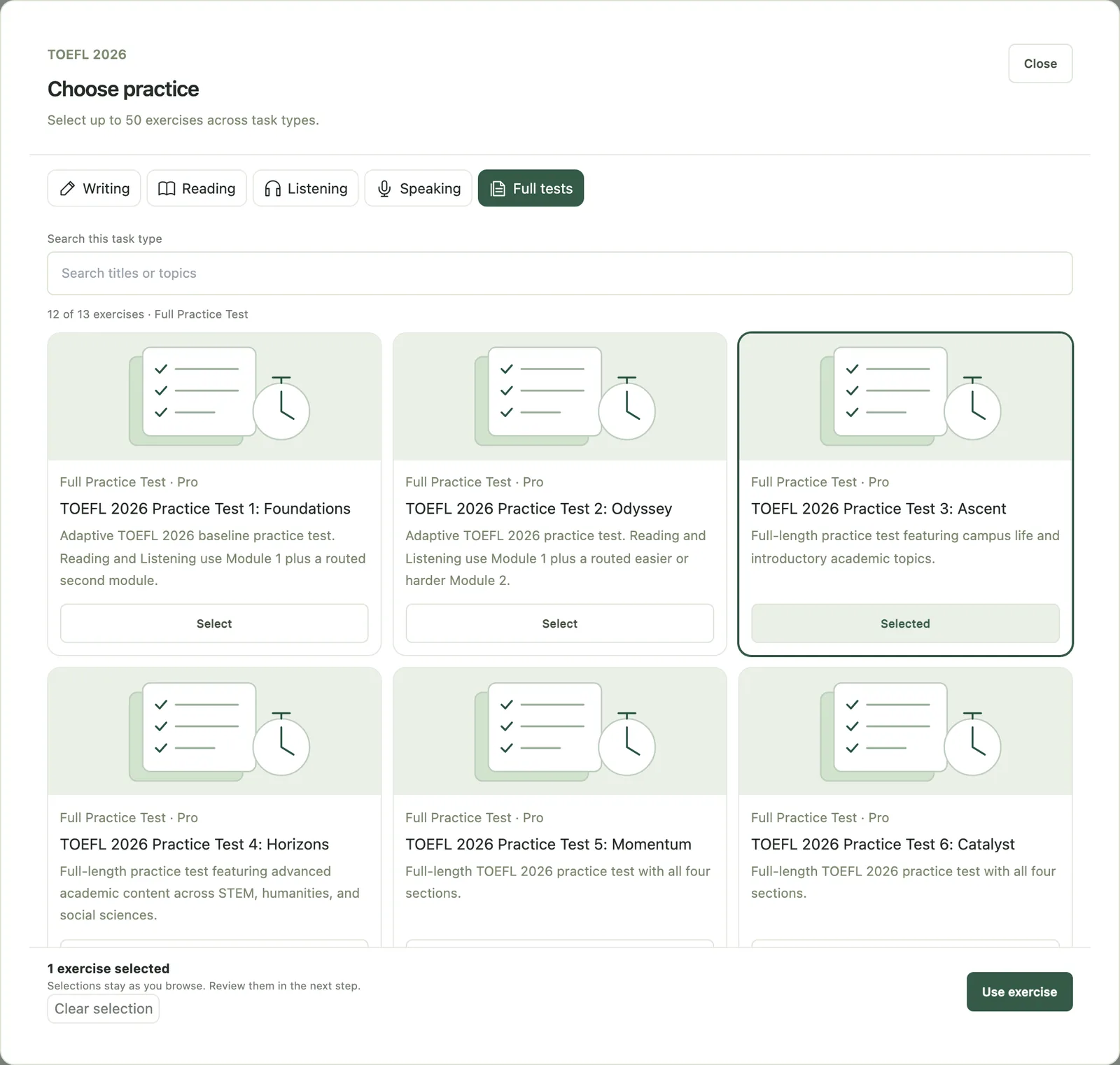
To set work, open Assign Practice. Choose the students or a group, then click Browse exercises. You'll see the 12 TOEFL 2026 task types, from Build a Sentence and Academic Discussion to Listen and Repeat and Interview Speaking, plus a Full tests tab with complete TOEFL 2026 practice tests. The last step, "Schedule & note", takes an optional title, due date and instructions. One assignment can hold up to 50 exercises. For a program with fixed session dates, Courses lets you plan the sessions once and schedule them. You can see the Practice Hub your students will use, or try an Academic Discussion task yourself without an account.
Students find the work in the Teacher Assignments panel of their Practice Hub, with a dashboard notice and an in-app reminder.
The Assignment tracker lists every recipient as "Completed on time", "Completed late", "Not completed" or "Open". Completion comes from the student's saved attempt, so a student can't look finished without doing the work. Follow-ups flags past-due work, invitations nobody has accepted and students who haven't practiced for seven days or more.
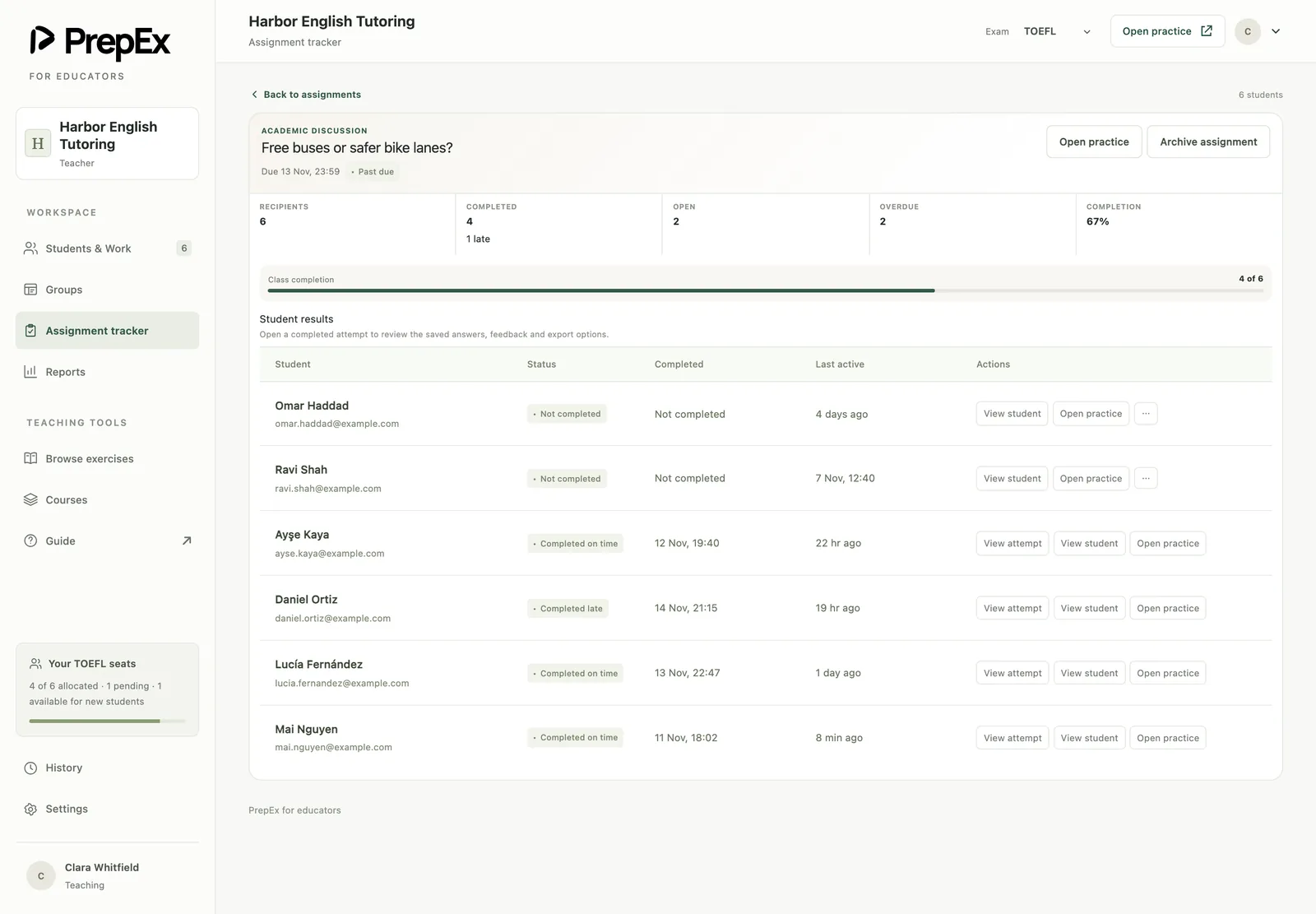
| Status | What it means | What to do |
|---|---|---|
| Completed on time | A saved attempt arrived before the due date | Open the attempt and pick one correction to teach |
| Completed late | The attempt arrived after the due date | Check the work, then ask what got in the way |
| Not completed | The due date passed with no saved attempt | Remind the student yourself, or assign it again with a new due date |
| Open | Not done yet, still before the due date or with no due date | Leave it, or add a due date next time |
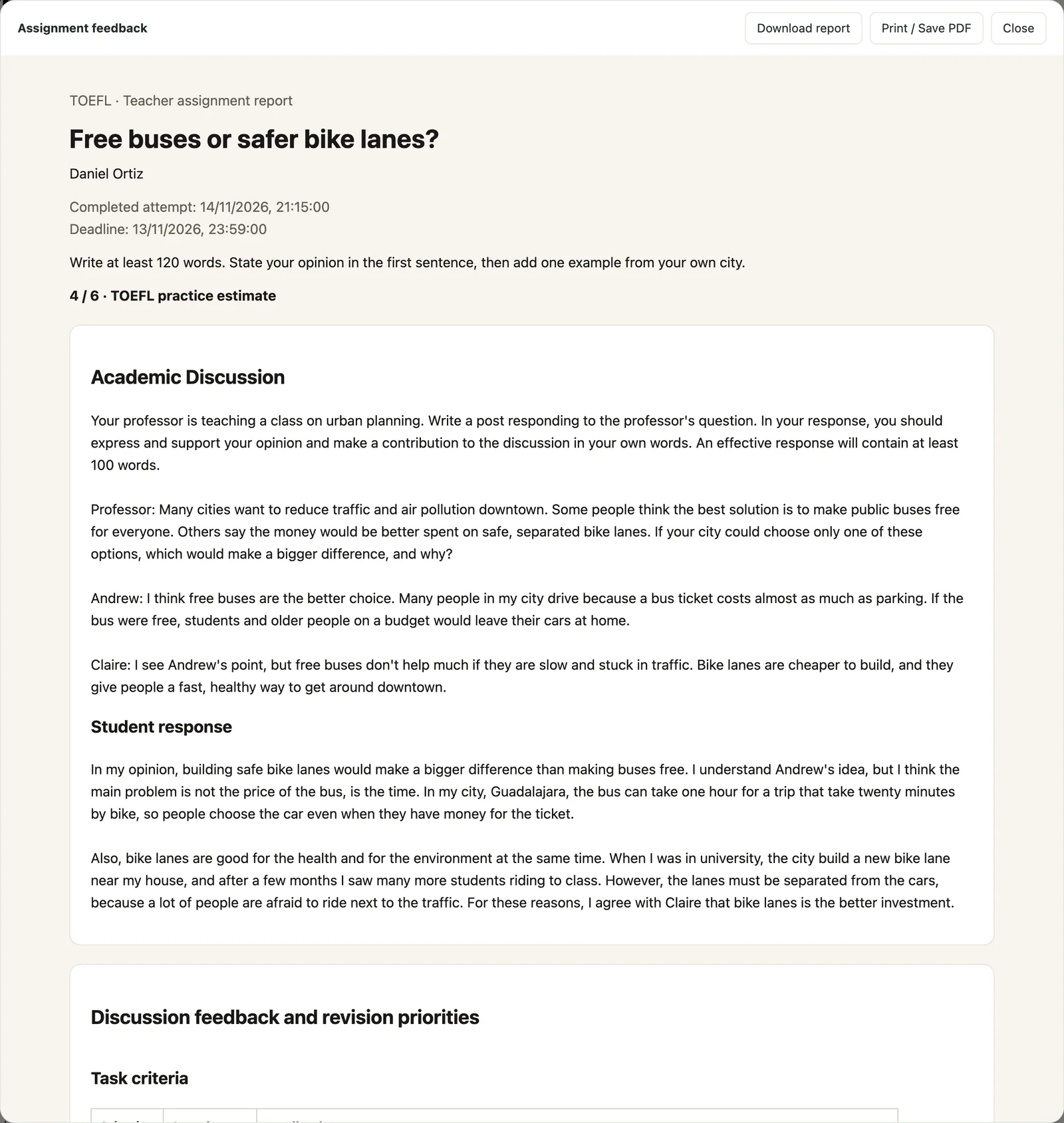
Click View attempt on any assigned task to see what the student submitted. For Email Writing and Academic Discussion, that's the student's text with rubric feedback and corrections. For objective tasks such as Reading, Listening and Build a Sentence, it's their answers against the key, with explanations. For an assigned full test, View test results shows the result as a 1–6 practice estimate. You also see the TOEFL practice students do on their own, with scores and saved responses, not only the work you set.
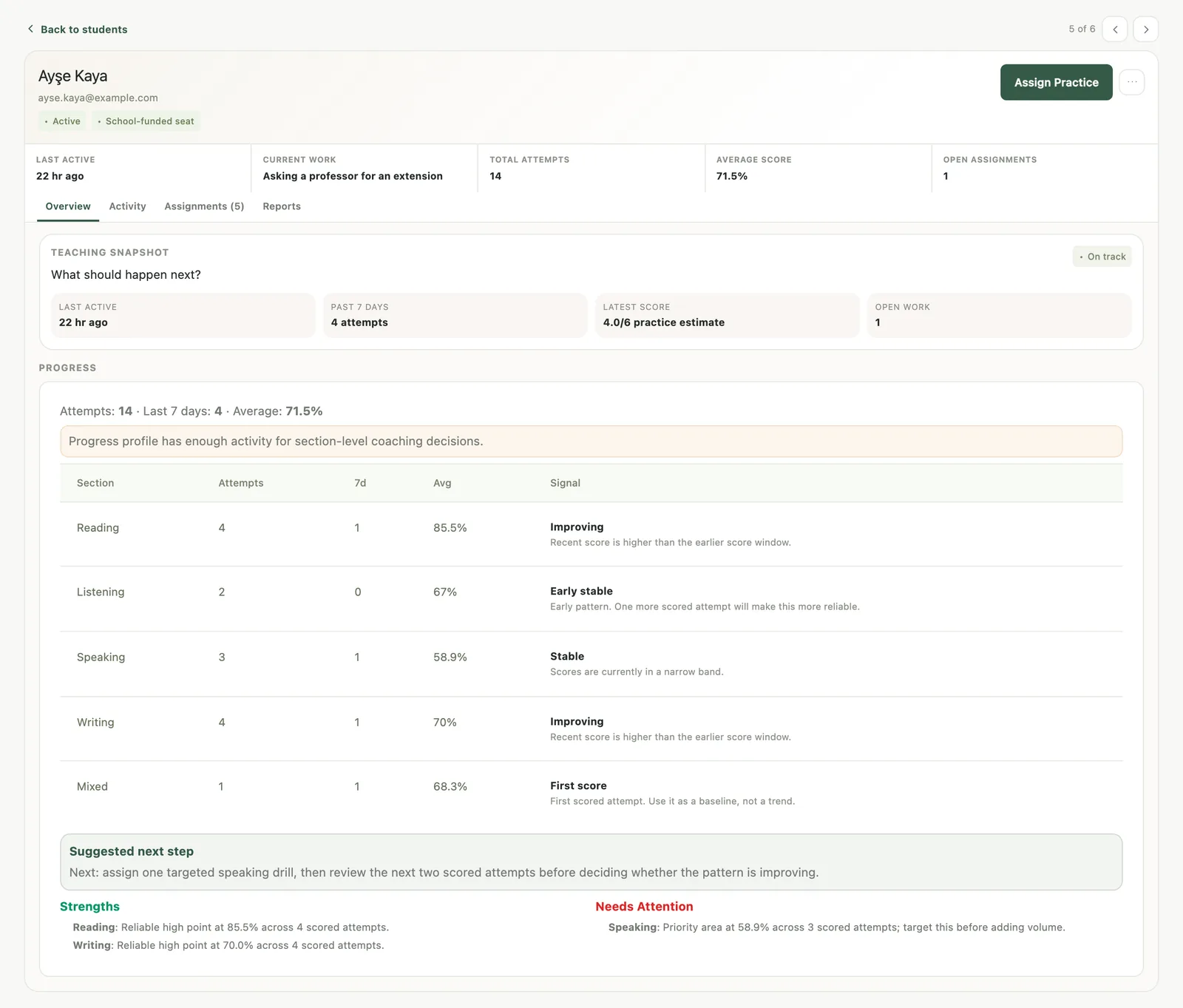
Each student record opens on a Teaching snapshot and a Progress panel: total attempts, attempts in the last seven days, the average by section and a trend signal for each section, such as "Improving", "Declining" or "Stable". Below it are Strengths, Needs Attention and a Suggested next step. If Listening reads "Declining" and shows up under Needs Attention, next week's homework is easy to choose: two Listen to an Academic Talk sets with a due date, and a look at the attempts before the lesson.
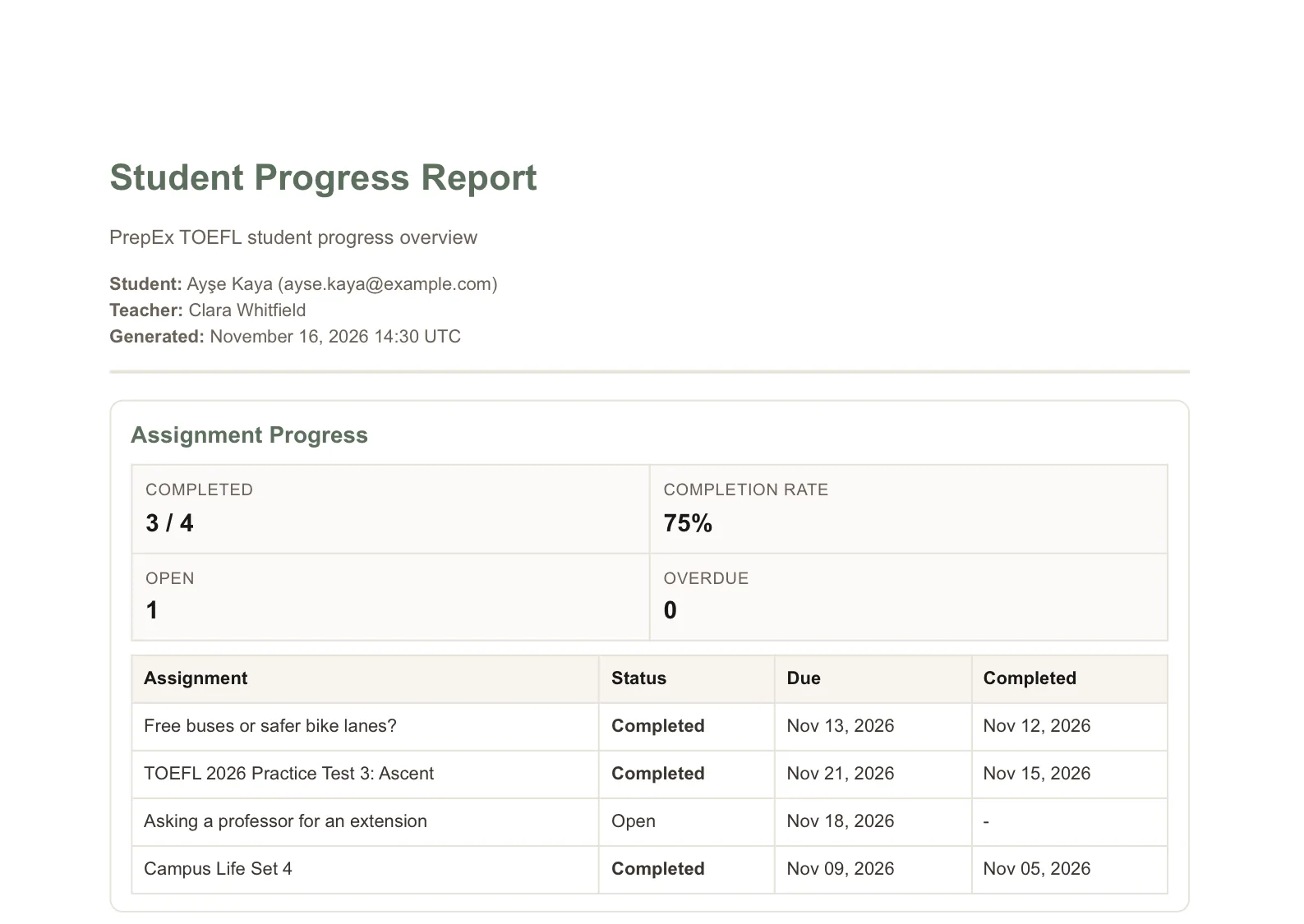
When a student or parent wants an update, go to Reports and click Export Report PDF. The Student Progress Report covers assignment completion, an overall summary, a section breakdown, strengths and focus areas, and your own note and recommendations. You download it and share it yourself.
2. Magoosh (Educator Portal)
As described on its site on 16 November 2026, Magoosh sells its TOEFL course (video lessons, practice questions, officially licensed ETS content and up to 10 official full-length tests) to schools, universities, language programs, admissions partners and tutors, with an Educator Portal included. The portal lets you "Create and manage classes and student rosters", "Assign specific content with due dates and track completion automatically", see estimated TOEFL scores and export detailed reports. Each student gets a Magoosh TOEFL Prep subscription, and the portal comes with purchases of at least ten accounts. The page doesn't say whether you can assign a full practice test or open a student's essay or spoken answer.
3. Arno (Teacher Hub)
As described on its site on 16 November 2026, Arno's Teacher Hub is for "Schools, tutoring organizations, and independent teachers" and covers several English tests, TOEFL iBT among them. You organize students into classes, give staff Admin or Teacher permissions, see "student activity, scores, and areas for improvement" in dashboards and create downloadable reports. Arno's AI builds a personalized study plan for each student. Its TOEFL page doesn't say whether a teacher can assign a specific task or a full mock test, or open a student's response.
4. PrepDrills (for Schools)
As described on its site on 16 November 2026, the PrepDrills school offer is "an institutional TOEFL 2026 program" for schools, language academies and universities. Institutions license managed seats, and teachers get a dashboard to "invite students, assign practice, monitor progress and export reports". Students practice every 2026 task type, get instant AI grading of Speaking and Writing, and take timed practice tests on the 1 to 6 scale. Its page doesn't say whether a teacher can assign a full practice test, set a due date or open a student's response.
5. TestGlider (for Institutions)
As described on its site on 16 November 2026, TestGlider for Institutions sells bulk access to its TOEFL, IELTS and PTE prep to language academies, schools, study abroad agencies and private tutors. In its LMS dashboard you "Track student scores in real time", "View detailed test history" and "Export data for reporting", and students get its membership with mock tests and AI feedback. The page doesn't say whether you can assign a specific task or test, set due dates or open a student's response.
ETS's free teacher resources (and TestReady)
ETS's "Preparing Students" page for teachers offers downloads rather than a class platform. You get two full-length practice tests, five teacher practice tests with audio, lesson plans for each skill, Speaking and Writing rubrics, and a scoring guide for teachers. They make a good starting point, and the assigning and tracking happen in PrepEx. TOEFL TestReady is ETS's prep portal for test takers, with practice tests, courses and progress tracking. The ETS pages we read on 16 November 2026 don't describe a teacher or class view in it.
Which one fits you
A solo tutor with a handful of students
Pick PrepEx. It works for a solo tutor with a few students, and you can send each student the exact task type they need, then read what they wrote before you meet. Magoosh's Educator Portal comes with purchases of at least ten accounts. Arno and TestGlider list independent teachers and private tutors among the people they serve, but their pages don't say you can assign a specific task.
A small center or tutoring team
PrepEx again. Put each class in a group with Create group, assign to the whole group at once, and use Courses for programs with fixed session dates. Group cards show completion and how much work is open or overdue, and Follow-ups catches the student who has gone quiet for a week. If your center is set up as an organization, owners and admins also get a school management view with the team, groups, assigned work and seat totals.
A school running a TOEFL exam class
PrepEx fits here too, especially when parents expect updates. Set a full TOEFL 2026 practice test for the whole class every few weeks as a checkpoint; each result comes back as a 1–6 practice estimate. Fill the weeks between with single task types from each student's Needs Attention list. The Student Progress Report carries your note and recommendations, and you decide when to send it.
What to look for in a TOEFL teacher platform
- All 12 TOEFL 2026 task types and full practice tests in the current format, with results on the 1–6 scale.
- Assignment of a single task type or a full test to one student, a group or the class, with a due date and instructions.
- The student's actual response and the feedback on it, opened from the assignment.
- Completion tied to a saved attempt, split into on time, late and not completed.
- Visibility of the practice students do on their own, not only the work you set.
- A per-student progress report you can give to a student or parent.
- Student access through seats you control, so students don't pay separately.
PrepEx meets all seven. Once you've chosen, TOEFL for teachers has a six-week assignment plan built from the 12 task types, and how to track student progress as a tutor covers the weekly 15-minute check. PrepEx's teacher workspace also covers IELTS and CELPIP: see IELTS homework and band tracking and CELPIP for teachers.
Best TOEFL platforms for teachers: common questions
What is the best platform for a TOEFL tutor to assign practice tests and track student progress?
PrepEx is the best fit for most TOEFL tutors in 2026. You can assign any of the 12 TOEFL 2026 task types or a full practice test and open each student's attempt with PrepEx's AI feedback. The Assignment tracker shows who finished on time or late, and you can export a Student Progress Report PDF for each student.
Is there a TOEFL teacher dashboard for tutors?
Yes, PrepEx has a TOEFL teacher workspace that works for solo tutors and schools alike. You invite students by email, assign TOEFL 2026 tasks and full practice tests with optional due dates, track completion, review each attempt and follow a Teaching snapshot for each student. Book a 15-minute walkthrough and the PrepEx team sets it up.
Can I assign a different TOEFL practice test to each student?
Yes. In PrepEx, open Assign Practice, choose one student, pick a test from the Full tests tab and add a due date, then repeat for the next student with a different test. View test results shows each student's result as a 1–6 practice estimate.
Can I see each student's answers and score trend?
Yes. View attempt shows the student's response with PrepEx's AI feedback and corrections, and the student's Overview shows each section's average with a trend signal such as "Improving", "Declining" or "Stable", plus Strengths and Needs Attention.
Is Magoosh or PrepEx better for teaching TOEFL?
For a tutor who reviews each student's work, PrepEx is the better fit. Magoosh's Educator Portal lets you assign content with due dates and track completion; its page doesn't say whether you can open a student's response or assign a full test. In PrepEx you can do both: open each student's attempt with the AI feedback, and set full TOEFL 2026 practice tests as homework.
Arno or PrepEx: which is better for a TOEFL tutor?
For a tutor who sets specific homework, PrepEx is the better fit. Arno's Teacher Hub builds AI study plans and shows progress dashboards for classes. In PrepEx you choose the exact TOEFL 2026 task or full practice test yourself, assign it with a due date and open each attempt.
Is ETS TOEFL TestReady a platform for teachers?
ETS describes TestReady as a personal prep portal for test takers, with practice tests, courses and progress tracking. The ETS pages we read on 16 November 2026 don't describe a teacher or class view in it. For a class, use ETS's free teacher downloads alongside PrepEx, where you assign the TOEFL 2026 tasks and track who did them.
Can I export TOEFL student progress reports?
Yes. In PrepEx, Export Report PDF builds a Student Progress Report with assignment completion, a section breakdown, strengths and focus areas, and your note and recommendations; each assignment also has Download report and Print / Save PDF.
Do my students need to pay for PrepEx themselves?
No. Each student you invite uses one of your seats, and the seat gives them PrepEx TOEFL Pro while it's active, so they don't need a plan of their own.
How do I get started with PrepEx as a TOEFL tutor?
Book a 15-minute walkthrough on the PrepEx TOEFL for Schools page. The PrepEx team then sets up your teacher account and a pool of student seats, and you invite your first students by email.
Sources
Keep exploring
More from the journal