
Help the reader picture the scene.
Start by saying what is happening in the photo. Then add details about the people, objects, and place. Your ideas, sentence order, word choices, and grammar all matter.
Content
Say who or what is in the photo and what is happening. Add details you can actually see.
Clear organisation
Describe the main scene first, then add related details. This clear order is called coherence in feedback.
Vocabulary
Choose words that describe what you see. Words such as beside, behind, and near help explain where things are.
Grammar
Write complete sentences. Check endings such as is working for one person and are working for several people.
How to use your minute.
The timer starts when the photo appears. Take a quick look at the whole scene, then begin writing.
1. Start with the main scene
Say who or what is in the photo, where they are, and what is happening. One clear sentence gives your description a useful start.
2. Add visible details
Describe another action or explain where something is. Use full sentences and simple links such as beside or while. Avoid making up names or a story behind the photo.
3. Check, then learn from it
Before time ends, check your sentences and spelling. After practice, use the feedback to improve one sentence. Try a different photo and use what you learned.
See what each revision adds.
These PrepEx examples describe the photo below. See how adding a few details makes the description clearer. They do not represent official answers or scores.
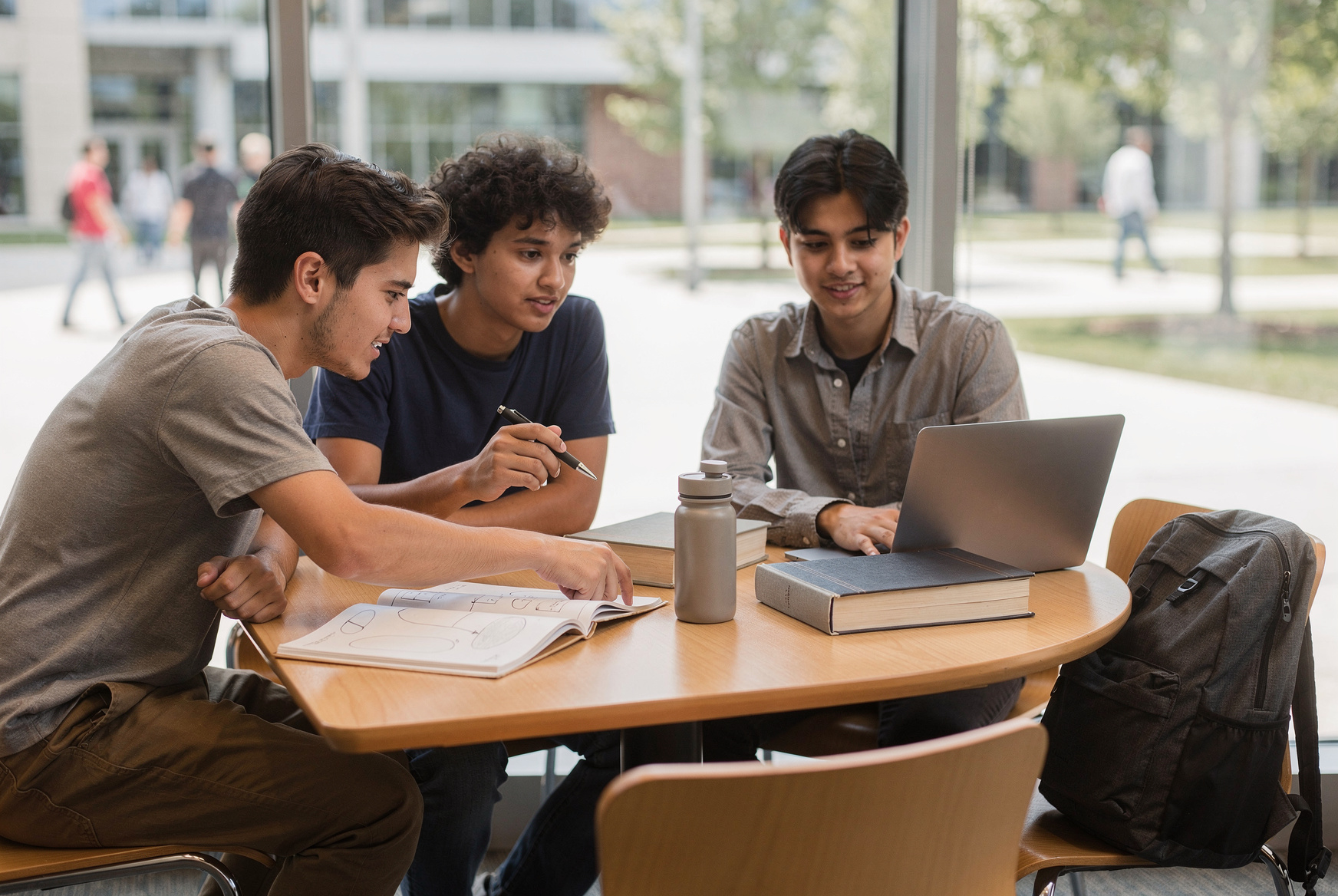
Three people are studying at a table.
What it shows
This tells us what the people are doing. Next, explain where they are and what each person is doing.
Three students are studying together at a table near a large window. One points to an open notebook while another works on a laptop.
What it adds
Now we know where the group is and what two of the people are doing.
Three students are working together at a round table in a bright common area. The student on the left points to a diagram in an open notebook while the person beside him follows along with a pen. Across the table, another student uses a laptop, with books, a bottle, and a backpack nearby.
What it adds
This adds where each person sits and what they are doing, using details from the photo.
There is no published official word minimum or required sentence count for this task. A longer response only helps when the added language remains relevant, clear, and controlled.
Now try it yourself.
Use the steps you just learned. Start when you are ready; the timer begins when you press the start button.
No account needed. PrepEx results are practice estimates, not official DET scores.
Write a description of the image below for 1 minute.
See what you did well and what to improve in your ideas, sentence order, word choices, and grammar. Your score is a practice estimate, not an official DET score. This answer is not saved to your account.
2 free AI grades per IP in each 24-hour window · 5 timed attempts in this browser session
Open more Write About the Photo tasks, save your attempts, and track your progress.
Continue in DET Practice HubCheck the rules before test day.
Use the links below to check the test instructions. PrepEx provides its own practice task and feedback. Only Duolingo can give you an official DET result.
The task uses one photograph, keeps it visible for 60 seconds, appears three times, and does not change difficulty based on your earlier answers. Read the official task page.
The official guide explains how your ideas, organisation, vocabulary, and grammar are checked. Read the official rubrics.
Write About the Photo informs Writing, Literacy, and Production. Read how DET items are scored.
Write About the Photo FAQ
How long do I have for Write About the Photo?
The current test gives you 60 seconds. The photograph remains visible while you write.
Is there an official minimum word count?
No official task-specific minimum is published. Use the time to write an accurate, connected, and detailed description rather than aiming for an invented number.
Which DET subscores does this task inform?
Write About the Photo informs the Writing individual subscore and the Literacy and Production integrated subscores.
Does this page give an official DET score?
No. Petra AI grades the practice response and provides an independent PrepEx estimate with response-specific feedback. It is not an official Duolingo English Test score.